Why does having a website matter?
How do we settle on the right purpose?
What is a domain and why does it matter?
Why does choosing a host matter?
The kinds of hosting and choosing the right one for your needs
Why does choosing a CMS matter?
The kinds of content management system
Important points in choosing the right CMS
The kinds of web design
The qualities of a good theme
In today's digital world, having a website is no longer a luxury or an extra but a fundamental need for individuals, businesses and brands of every kind. The internet has become the place most people use to find information, buy products, use services and even interact socially. If a business or a person wants an effective presence there, a website is one of the main tools they need.
Why does having a website matter?
Greater credibility and trust: many customers search the internet before buying or using a service. Having a professional website can increase your credibility in users' eyes.
Available around the clock: unlike a physical shop, a website is always available to users and can offer information or sell products without limits of time.
Reaching more customers: a website makes it possible to reach new customers around the world, and you will no longer be limited to a particular area.
Complete control over your brand and content: on social networks, your content and how your brand appears are subject to the platform's algorithms and policies, whereas on a website you can control entirely how your content is presented.
Lower marketing costs: digital advertising and SEO can reduce advertising costs compared with traditional methods and give a better return.
Below we look at what we need in order to create a successful website.
Establishing the site's purpose

Before setting up a website, the first step is establishing its purpose. Every website should have a defined purpose so that its structure, its content and the capabilities it needs can be settled properly.
Establishing that purpose from the outset means:
The cost and time of designing the site are better spent.
The domain name and hosting are chosen to suit the need.
The site's design and structure suit the target audience.
The site's content is purposeful and effective.
The kinds of website and their purposes
A personal website:
Presenting a CV and a portfolio
Presenting skills and abilities
Building a personal brand
A corporate website:
Presenting the company and its services
Showing contact details and how to get in touch
Presenting sample projects and a track record
An online shop:
Selling products or services directly
Providing an online payment gateway
Managing orders and dispatch
A blog or content site:
Publishing articles and educational material
Reaching an audience through SEO and advertising
Earning from advertising and content marketing
A news website:
Publishing the day's news and analysis
Increasing visitors through search engines
Earning from advertising and special subscriptions
A service website:
Offering online services (consultancy, design, development and so on)
Building direct engagement with customers
Taking bookings and orders online
How do we settle on the right purpose?
Consider your needs and your skills: if you intend to sell, an online shop suits you; if you produce content, a blog is the best option.
Know your target audience: examine what your users need and how you can meet those needs.
Have a long-term plan: choosing a purpose that leaves room for growth and development will make the website more successful.
Having established the website's purpose, the next step is choosing a suitable domain name, which we look at in the next section.
Choosing a suitable domain name
Choosing a suitable domain name is one of the most important steps in setting up a website. The domain name is the address users enter in their browser to reach your site (example.com, for instance). A good domain can bear directly on branding, on SEO and on reaching users.
What is a domain and why does it matter?
A domain is your digital identity on the internet and should be chosen so that it:
Is memorable, so that users can readily search for it and type it.
Is relevant to what the site does, so that users can quickly understand its purpose.
Is short and readable, so as to prevent typing mistakes.
Is well made for SEO and, where possible, contains keywords relevant to your field.
Important points in choosing a domain name
Simplicity and readability:
Avoid complicated or difficult words and unusual spellings.
Avoid unusual combinations of numbers and hyphens.
Relevance to the site's subject:
If your site is a shop, it is better for its name to relate to your field (digimarket.com, for instance).
Creative names that strengthen your brand's identity are also good options.
Not using unsuitable symbols and numbers:
Domains containing numbers and hyphens are hard to remember (my-site-123.com is not an ideal name).
Avoid long names that are hard to write or pronounce.
Checking whether the domain is available:
Before choosing a domain, check whether the name has already been registered by someone else.
You can use sites such as whois.domaintools.com, or domain registrars such as GoDaddy and Namecheap, to check a domain's status.
Domain extensions and the differences between them
A domain extension (TLD, top-level domain) is the final part of a site's address and can have a considerable effect on a domain's credibility and its use. Some of the most widely used extensions are:
.com – the most common and the best option for most sites, particularly international businesses.
.ir – suited to Iranian websites and to businesses operating in Iran.
.net – used mostly for sites to do with technology and networks.
.org – suited to organisations and non-profit institutions.
.shop – particular to online shops
.co – an option for start-ups and young companies.
Choosing suitable hosting for a website
Hosting is the space in which your site's files are stored and which users reach by entering the domain name. Choosing suitable hosting is one of the vital stages in setting up a website, because it bears directly on how the site performs, on its load speed, on its security and on its availability.
Why does choosing a host matter?
A site's speed: good-quality hosting can improve your site's page load speed, and that bears directly on the user's experience and on the site's SEO.
Stability and availability: hosting with high uptime means your site will be continuously available and will run into fewer outages.
Security: good hosting provides greater security and prevents hacking and unauthorised access to a site's sensitive information.
Technical support: hosting with strong support can help you quickly when technical problems arise.
The kinds of hosting and choosing the right one for your needs
Shared hosting:
With this kind of hosting, several websites are hosted on one shared server. It is cheaper and suits small, new websites.
Advantages: a low price, simple management, suited to sites with low traffic.
Drawbacks: limits on server resources (RAM, CPU), poor performance when traffic rises.
VPS hosting (virtual private server):
With this kind of hosting, a server is divided virtually and each website has its own resources. It suits websites with moderate traffic.
Advantages: dedicated resources, better performance than shared hosting, more control.
Drawbacks: takes technical knowledge to manage, costs more than shared hosting.
Dedicated hosting:
With this kind of hosting, a whole server is given over to your website alone. It suits high-traffic sites or sites needing a great many resources
Advantages: complete, dedicated resources, stability and high speed.
Drawbacks: a very high price, needs professional server management.
Cloud hosting:
With this kind of hosting, your site is hosted on several servers and resources are allocated dynamically. It suits websites needing a great deal of scalability.
Advantages: excellent scalability, high stability, suited to high-traffic and advanced sites.
Drawbacks: a higher price, more complicated to manage.
WordPress hosting:
This kind of hosting is optimised particularly for sites built with WordPress. It usually includes automatic WordPress installation and optimisations particular to it.
Advantages: optimised for WordPress, easy to install and set up.
Drawbacks: limits with other content management systems.
Important points in choosing suitable hosting
Storage space: depending on the size of your site's files, the hosting should have enough storage. For a small website, around 50 to 100 megabytes is generally enough to begin with.
Monthly traffic: some hosts limit the amount of traffic (or the number of visitors). Choosing hosting with unlimited monthly traffic, or traffic suited to your needs, is essential.
24/7 technical support: check that the hosting you choose provides technical support around the clock and through several channels (chat, email, telephone).
Security: the hosting should provide capabilities such as SSL, a firewall and regular backups to keep your site secure.
Scalability: if you intend to grow your website, the hosting you choose should make it possible to upgrade resources and to scale.
The server's location: if your target market is in Iran, it is better to choose servers within Iran or in a nearby region so that the site loads faster.
Choosing a content management system (CMS)
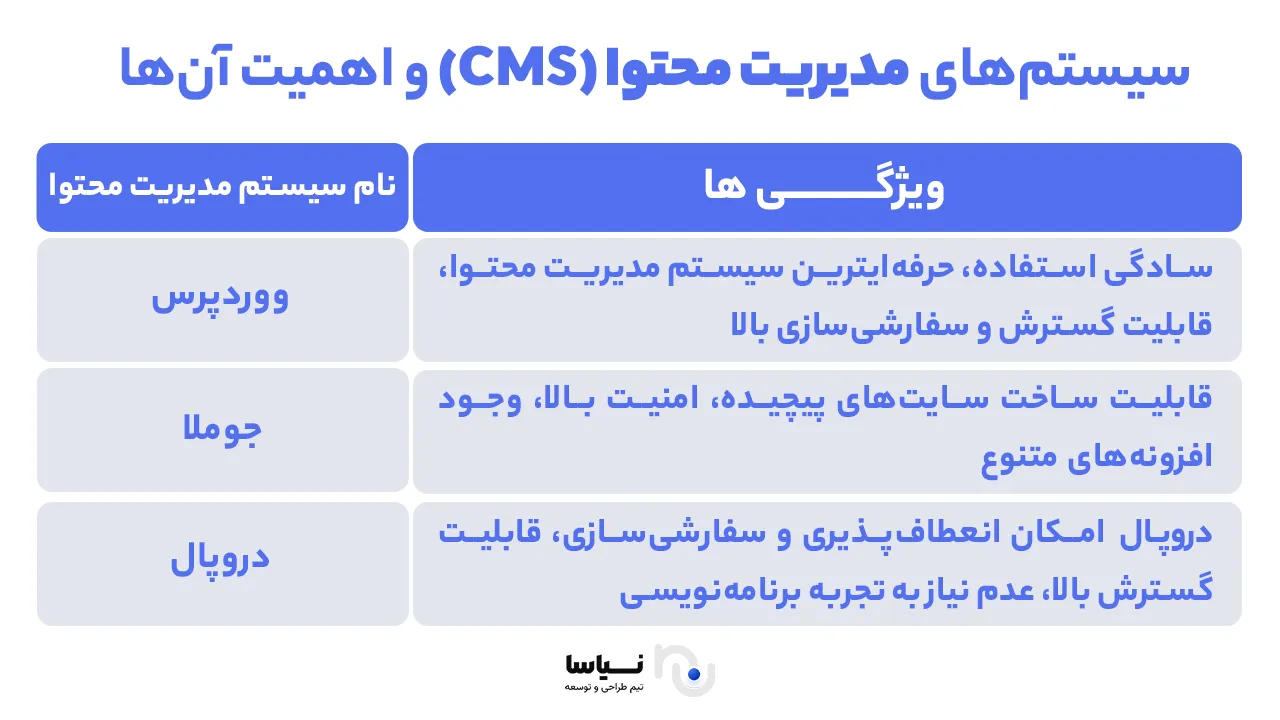
A content management system, or CMS, is a tool that lets you manage your website's content without writing code. These systems help you readily create, edit and manage your site's pages, posts, images and other material. Choosing the right CMS is one of the most important stages in setting up a website, because it bears considerably on how the site performs and on how simple it is to manage.
Why does choosing a CMS matter?
Simplicity in managing content: with a CMS you can readily add or edit a site's material without technical knowledge.
Additional capabilities and plugins: most CMSs have additional capabilities and plugins that can improve how your site performs: contact forms, image galleries, SEO and so on.
Support and a large community: most CMSs have a wide user community and online support that can help in solving problems.
Scalability: content management systems are generally scalable, and you can readily grow your site.
The kinds of content management system
WordPress
WordPress is one of the most popular and widely used CMSs, and around 40% of the world's websites use it. It suits any kind of website: blogs, online shops and corporate sites.
Advantages:
Easy installation and a simple interface
A great many plugins for adding capabilities
A range of professional themes
Wide support and free tutorials
Drawbacks:
Needs continuous updating
Relative security, which may fall if a great many plugins are used.
Joomla
Joomla is another popular CMS, suited particularly to sites with more complicated needs. It offers more than WordPress but is somewhat more complicated.
Advantages:
Great flexibility and a great deal of capability
Suited to complicated sites needing a particular structure
Drawbacks:
Takes more learning than WordPress
A smaller user community and more limited support.
Drupal
Drupal is one of the most powerful content management systems, designed for sites with very particular and complicated needs.
Advantages:
High security and excellent scalability
Suited to large, complicated websites
Drawbacks:
Takes technical knowledge and more time to learn
More complicated to install and configure than WordPress.
Shopify
Shopify is a content management system particular to online shops. It gives you all the tools you need to create and run one.
Advantages:
Suited to online shops and e-commerce
A range of tools for managing sales, payment and dispatch
High security and excellent technical support
Drawbacks:
Monthly costs and some limits on customisation.
Important points in choosing the right CMS
The site's needs: if you intend to set up a simple site such as a blog or a corporate site, WordPress is a suitable option. If you need a complicated site with particular capabilities, though, Joomla or Drupal may be better options.
Technical knowledge: if you have no technical experience, it is better to use a simpler CMS such as WordPress or Wix. For more complicated or larger sites, you may need more technical knowledge.
Support and user community: CMSs such as WordPress and Joomla have a wide user community that will help you learn and solve problems.
Scalability: if you intend to grow your site, choose a CMS with a great deal of scalability (WordPress, Joomla, Drupal).
Choosing a content management system lets you manage your site's content readily. For a simple site, WordPress is a suitable option, while for more complicated sites or online shops, options such as Joomla, Drupal or Shopify may be better.
Choosing a design and a theme for the site
A professional web design is one of the main pillars of reaching visitors and creating a positive user experience. At this stage you have to decide whether you will use a ready-made theme or intend to create a distinctive, bespoke design for your site. Choosing the right theme affects not only a site's appearance but also how it performs and how fast it loads.
Why does choosing the right design matter?
The user experience (UX): a website's design has to be user-friendly and make it easy for visitors to reach the site's information and services.
Reaching visitors: a beautiful, professional design leads visitors to spend more time on your site.
Better SEO: a good design and a sound structure can help improve SEO and bring your site higher in search results.
Accessibility: a good design means your site displays readily on a range of devices (phone, tablet, computer).
The kinds of web design
A ready-made theme
This kind of design uses ready-made themes produced by professional designers or by website-building platforms. They help you set up your site quickly.
Advantages:
Cheaper and faster than a bespoke design
A great many options for choosing a theme to suit your site's needs
Simple to use and to customise
Drawbacks:
Your site may end up looking like other sites
The scope for customisation may be limited.
A bespoke design: a bespoke design lets you have a site designed entirely to your own needs and taste. It takes a professional design and development team.
Advantages:
A distinctive, bespoke design
A great deal of scope for customisation and greater flexibility
Better branding and a particular identity for the site
Drawbacks:
Costs more than a ready-made theme
Takes longer to design and build.
The qualities of a good theme
A good theme has to have particular qualities so that it can perform well and provide an excellent user experience:
Responsive design: meaning that your site displays well on a range of devices such as phones, tablets and computers.
High load speed: the theme should be well made so that your site loads quickly, because load speed is one of the important factors in SEO and in the user's experience.
A simple, clear structure: a site's structure should be simple and clear so that users can readily reach the information they want.
Support for SEO: a theme should be designed so that it helps improve your site's ranking in search engines.
Support for plugins and tools: a theme should be able to support a range of plugins and tools so that you can add further capabilities to your site.
Choosing the right design and theme has a considerable effect on the user's experience and on your site's success. A theme should be simple, responsive and fast and should provide what your business needs. A bespoke design suits large, complicated sites, while ready-made themes can be a good option for simple sites and start-ups.
Adding the capabilities you need
Once the design, the domain and the hosting are settled, it is time to add the capabilities a site needs. They help your site perform better, give a better user experience and produce a better return. In this section we look at some of the essential capabilities for different kinds of site: a contact form, a user membership system, an online shop, an online payment gateway, an order management system and the plugins needed.
A contact form
A contact form is one of the fundamental parts of any website, letting users get in touch with you readily. Having a simple, practical contact form can improve your dealings with users and customers.
Why is a contact form essential?
Quick contact with users: users can readily send their questions or particular requests through a contact form.
Keeping users' trust: providing a clear route of communication shows trust in and engagement with users.
More sales and customers: a contact form can act as a means of receiving requests and orders from customers.
A user membership system
If your site needs users to register and sign in, setting up a membership system is essential. It can be simple or advanced and can be used on any kind of site: educational, e-commerce or forums.
Why does a user membership system matter?
Better management of users: with membership, you can store users' information and their history and offer a more personalised experience.
Continuous contact: through emails to registered members, you can keep them abreast of the latest news, products or discounts.
Greater engagement: members can readily leave their comments, save material and take part in discussions.
An online payment gateway and an order management system
If you have an online shop, you will need an online payment gateway and an order management system. They make paying easier and let you manage customers' orders effectively.
Why are an online payment gateway and an order management system essential?
Secure payment: an online payment gateway has to be secure so as to protect customers' financial information.
Easy order management: with an order management system, you can follow each order's status from receipt to dispatch and give customers precise information.
Installing the plugins and tools you need
To improve how a site performs and add further capabilities, you need to install various plugins and tools. They can help with SEO, security, content management and even your site's speed.
Why is installing plugins essential?
Better performance: plugins can add a range of capabilities to your site: search filters, image galleries, surveys and a great deal more.
Better SEO: SEO plugins help you optimise your site's content so that it appears higher in search results.
The site's security: security plugins protect your site against various attacks and increase its security automatically.
A site's security and support
Security and support are vital parts of setting up and maintaining any website. Keeping a site secure, protecting users' information and ensuring that it works properly all matter particularly. In this section we look at how to secure a site, at why an SSL certificate matters, at how to take backups, and at why continuous updating and resolving technical problems matter.
An SSL certificate (Secure Sockets Layer) is a security protocol that encrypts the communication between users' browsers and a website. It is essential in particular for sites that gather sensitive information such as credit card details, usernames and passwords.
Why is an SSL certificate essential for a site?
Greater security: an SSL certificate encrypts users' information and prevents unauthorised access to data.
Users' trust: when users arrive at a site and see that its address begins with "https", they feel more secure. That matters a great deal in particular for online shops or sites that receive users' personal information.
A better ranking in Google: Google gives a higher score to sites that use an SSL certificate, and that can improve a site's ranking in search engines.
How to install an SSL certificate:
Choose a suitable certificate: depending on your site's needs, you can buy a simple or an advanced SSL certificate.
Install it through your hosting: many hosting providers install SSL certificates readily for a site.
Be sure it is fully enabled: once installed, be sure your site's address begins with "https" and that this secure protocol applies across every page of the site.
Taking backups of a site
Taking backups of a site is a preventive measure against losing its information and data. It can be useful when technical problems or cyber attacks arise and helps restore a site quickly.
How do we take a backup?
Install a backup plugin: various plugins such as UpdraftPlus and BackWPup exist for WordPress and take backups of your site automatically.
Back up by hand: if you would rather not use a plugin, you can take a backup of the database and the site's files by hand.
Store it in the cloud: for greater security, store the site's backup in the cloud, on Google Drive or Dropbox.
Important points in updating a site:
Check that plugins are compatible: before updating, make sure that the plugins and themes are compatible with the new version, so as to prevent technical problems.
Test the update in a staging environment: where possible, test updates first in a staging environment so as to be sure no problems arise.
Inform users: if problems or disruption arise on the site after an update, inform users by email or message.
In summary
Building a successful website is a slow and complicated process that takes planning, attention to detail and a number of steps. From choosing a suitable domain and hosting to a user-friendly design and search engine optimisation, all of these can have a considerable effect on your site's success. Continuous care and development of a site through regular updating, security and SEO also mean that your site carries on growing and gets ahead of your competitors.