Ways of preventing a site from being hacked
What to do if a site is hacked
Are you facing a large volume of attacks in running your WordPress site? To stop a site being hacked, one of the first steps is securing the WordPress admin area against unauthorised access. With that simple but vital measure, you can neutralise a large part of the common threats. A site's security does not begin to matter only after it is launched; it should always and continuously be at the centre of your attention. Preventing a site from being hacked is a serious necessity, because neglecting it can do irreparable damage to your website's reputation and to how it works. Your website is a valuable asset — to you, to your users, and of course to the hackers looking to exploit any opportunity. Fortunately, preventing a site from being hacked takes no advanced programming knowledge or specialist security skills; it is enough to follow this article carefully to the end. Our aim is to offer complete, practical guidance on protecting your website against cyber attacks of every kind. In this article we set out effective ways of preventing a site from being hacked that can be the strong defensive shield you need.
Ways of preventing a site from being hacked
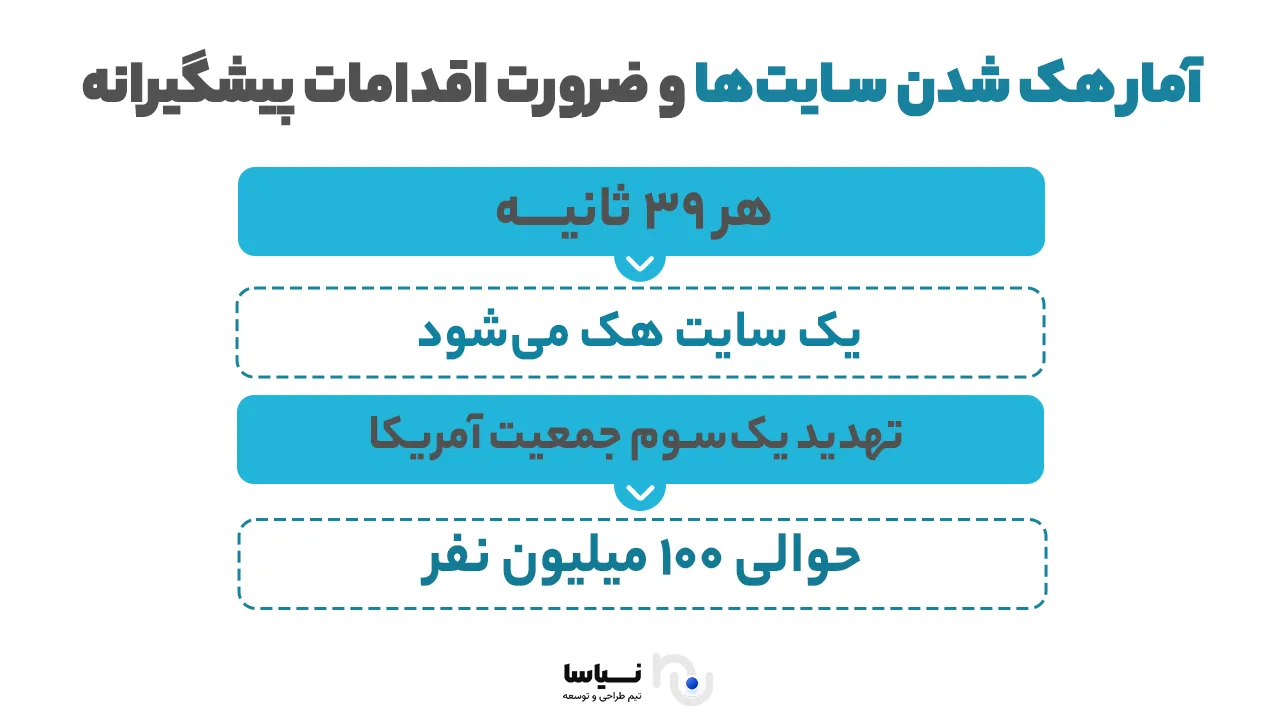
Given that more than 360,000 new viruses and pieces of malware are created online every day, preventing a site from being hacked matters more than ever. That figure is rising quickly, and it may well have grown even as you read this article. You may think your site holds nothing of value to a hacker; that view is mistaken. Preventing a site from being hacked matters not only to large or e-commerce sites. Almost any site, whatever its content, can become the target of an attack. The purpose of many of these attacks is not only to steal information but to abuse a site in other ways: sending spam, creating malicious backlinks, or even using server resources to mine cryptocurrency. Preventing a site from being hacked, particularly against the automated scripts hackers develop, is an undeniable necessity. These scripts search for vulnerabilities without pause, and the smallest lapse can let them in. Having a specialist website design built by a professional team also helps you stay safe against attacks. Below we set out a set of the best and most practical ways of preventing a site from being hacked. Do not be daunted by the length of the list; by choosing a few key measures you can take effective steps towards improving your site's security.
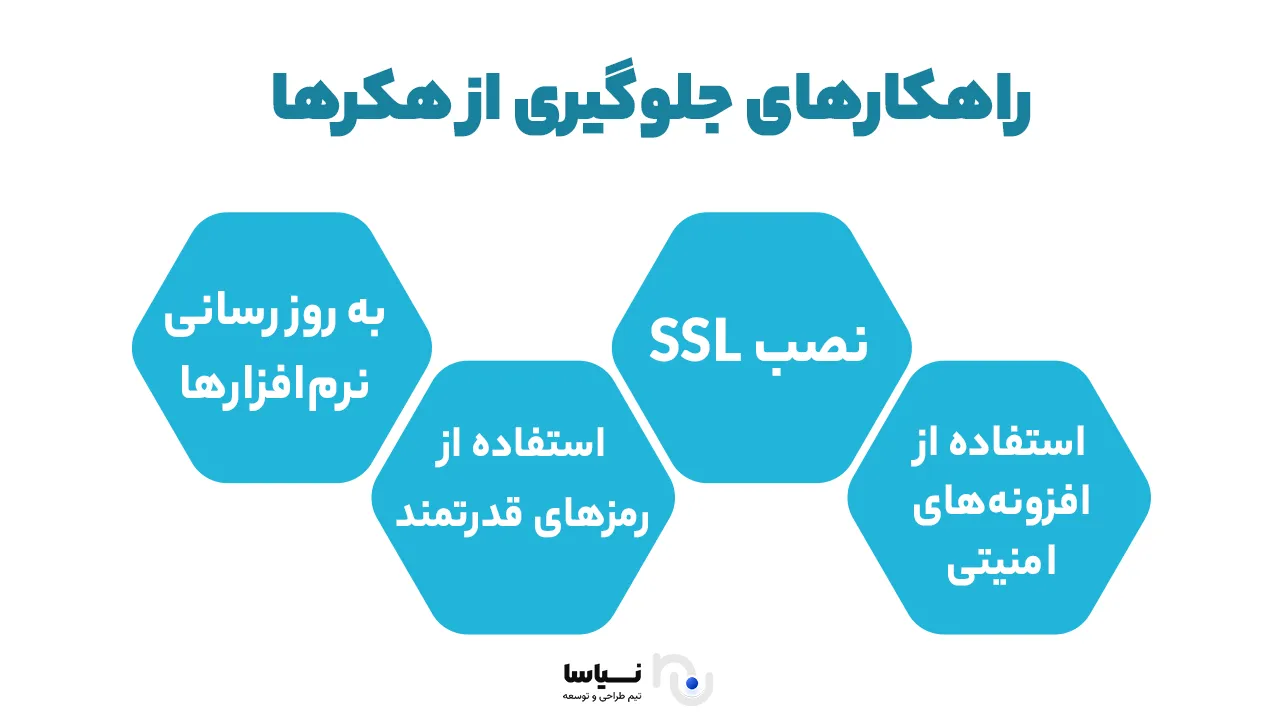
First: keep your theme, plugins and WordPress up to date
One of the simplest but most effective ways of preventing a site from being hacked is to update WordPress, your theme and your plugins regularly. Hackers are continuously looking to identify security weaknesses in older versions of plugins and themes and to break into sites through them.
To prevent a site being hacked, it is essential always to use the latest official versions. The WordPress content management system and reputable plugins usually fix identified security holes with every update. Delaying an update therefore increases the risk of a site being breached sharply. Note that you should never use nulled or unofficial themes and plugins. They usually contain malicious code and readily put your site's security at risk. To prevent a site being hacked, you should obtain plugins and themes from reputable sources and enable their automatic updates. Remember that many attacks happen because of neglect of this very simple point — updating regularly. With that easy step, then, you can take a considerable stride towards preventing your site being hacked.
Second: guard against code or URL injection
Another common way of breaking into a site is a code or URL injection attack. In this kind of attack, a hacker enters malicious commands into a site's input fields and tries to gain unauthorised access to the database and steal sensitive information. To prevent a site being hacked, you should be particularly alert to these attacks. SQL or URL injection happens when users' input is not properly validated. The first step in preventing a site being hacked is therefore to check and filter the data coming into the website. Methods such as sanitising input and using prepared statements can have a considerable effect here. Updating plugins and the content management system regularly and using powerful security plugins also provide a strong shield against attacks of this kind. Do not forget that one of the key principles in preventing a site being hacked is protecting sign-up forms, search forms and other inputs against malicious commands.
As an important point, always look at your site's security logs regularly so that if you notice suspicious behaviour you can quickly take the measures needed to prevent your site being hacked.
Third: protect against XSS attacks
Another serious threat to a website's security is XSS, or cross-site scripting. In this kind of attack, a hacker places malicious JavaScript in parts of a site that have not been properly sanitised and can then steal users' information or gain access to their accounts. To prevent a site being hacked, then, proper measures against these attacks have to be taken.
XSS attacks usually happen through survey forms, comment sections or even a site's search. By entering malicious code there, a hacker causes it to run when other users visit, and sensitive data such as cookies, login details and other security information is stolen. To prevent a site being hacked through XSS, observing simple but effective principles is essential. First, all user input has to be validated and sanitised before being shown on the site. Second, security plugins able to counter XSS attacks should be used — plugins that identify suspicious input automatically and prevent malicious code from running. It is also recommended that parts of a site where users can enter content, such as contact forms and comments, be watched carefully. Do not forget that training the site's support team can also play an important part in preventing a site being hacked.
Fourth: be careful with error messages
Handling error messages properly plays an important part in preventing a site being hacked. Error messages should not display sensitive technical information, because that can give hackers clues about a site's structure. It is better for messages to be general and simple: rather than specifying whether the username or the password was wrong, for instance, show a general message such as "the username or password is incorrect". Information such as file paths, software versions or database connection details should not be shown in public errors. In a content management system such as WordPress, you can disable the display of sensitive errors and store them securely in log files that only administrators can reach. Looking at those logs regularly can also help identify vulnerabilities and prevent attacks.
Fifth: pay attention to your users' passwords
Using strong passwords is one of the most important measures in preventing a site being hacked, particularly a WordPress site. A password should combine letters, numbers and special characters so that hackers cannot readily guess it. Strong passwords matter a great deal for the server, for the admin area and for accounts with elevated access. WordPress membership plugins usually offer settings requiring strong passwords. Password managers also help create safer passwords. If your site has several authors, you have to be careful that they too use strong passwords, because weak ones can make unauthorised access easier. To prevent that, you can install plugins such as Password Policy Manager, which stops users saving weak passwords. Strong passwords play a fundamental part in protecting sensitive information and in a site's overall security.
Sixth: prevent the upload of any kind of file
Letting users upload any kind of file can be a serious security threat to a site. One of the best ways of preventing a hack is to limit the file types allowed. Uploading malicious files such as PHP scripts can lead to hackers breaking in and taking control of a site. You should therefore allow only particular formats such as JPG, PNG and GIF. That limit can be applied in an upload form's settings or, for greater security, by adding code to the .htaccess file so that only particular files may be uploaded. This measure reduces the security risks associated with uploads considerably.
<Files ~ "^\w+\.(gif|jpe?g|png)$">
Order deny,allow
Deny from all
Allow from all
</Files>
With this code, only files with image extensions (GIF and JPG, for instance) may be uploaded, and suspicious or malicious files are prevented. This code may not be necessary for you, but you can use it if it is. It is important to know that these measures are among the basic principles of preventing a site being hacked. Hackers may try to deceive your system into accepting suspicious files, but with these limits in place their chances of succeeding fall sharply.
Seventh: use SSL (HTTPS) on your site
One of the key principles in preventing a site being hacked is using SSL (HTTPS). This protocol secures the exchange of information over the internet and is essential in particular for sites that receive sensitive information from users. When your site uses SSL, all data between the server and the user's browser is encrypted automatically, which prevents hackers from reading or changing it. Using HTTPS increases users' trust in your site, because browsers display sites without SSL as "not secure". Using HTTPS also has a positive effect on a site's SEO ranking, and search engines such as Google give more credit to sites that use it. To install SSL, you can use a reputable SSL certificate provider. Installing SSL matters a great deal in particular for sites receiving personal information or online payments. It is recommended that you use HTTPS across every page of your site.
Eighth: use security plugins on your site
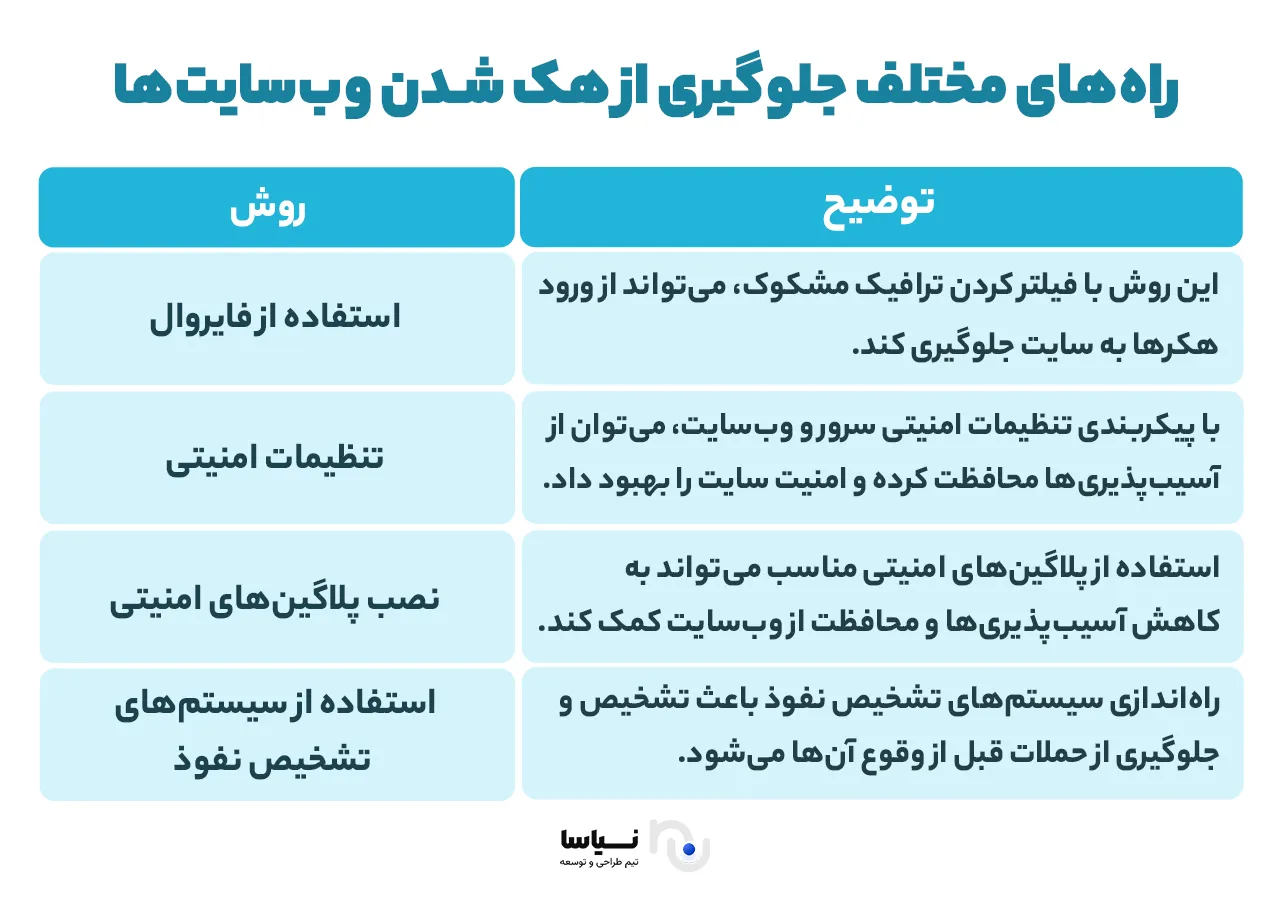
One of the most important measures in preventing a site being hacked is using reputable security plugins. They act as a strong line of defence and protect your site with tools such as a firewall, a security scanner and access restrictions. Hackers are constantly looking for new ways in, so a security plugin is a necessity. Wordfence is one of the most popular options for WordPress, offering capabilities such as monitoring site traffic, identifying threats and blocking attacks. All In One WP Security & Firewall also provides wide security capabilities free and suits small and medium sites very well. With these tools you can prevent attacks such as DDoS, SQL injection and brute force. It should be borne in mind, though, that security plugins are not enough on their own and that measures such as updating your site, using strong passwords and enabling SSL should be taken alongside them so that a site's security is at its greatest.
Ninth: take regular backups of your site
Taking and keeping regular backups of a site is an essential measure in preventing the damage caused by cyber attacks, server failure or human error. If something goes wrong, a backup lets you return your site to its earlier sound state and prevents the loss of sensitive information. Regular backups matter a great deal, particularly after an update or an important change. To that end you can use WordPress backup plugins such as Duplicator, which makes taking and storing backups very simple. Many hosting companies also provide automatic backup services. Backups do not prevent an attack, but if a security problem arises they are a lifesaver. Having a sound strategy for taking and storing backups lets you restore your site quickly and without serious damage in a crisis.
Tenth: use a website firewall
Using a website firewall (WAF) is one of the effective ways of preventing a site being hacked. A firewall watches incoming traffic continuously and identifies and blocks suspicious requests. Among the various tools available, Wordfence is one of the best options for WordPress, repelling threats with its cloud firewall before they reach the server. Wordfence offers qualities such as continuous traffic monitoring, control over user access, identifying and managing risks, preventing intrusion attacks such as SQL injection and XSS, blocking bots and identifying new threats. Using the Wordfence firewall alongside other security measures creates a strong line of defence and helps protect a site effectively. Installing a powerful firewall should be among the first security measures on any site.
Eleventh: password-protect the WordPress admin directory
Another effective way of preventing a site being hacked and increasing its security is to put a password on the WordPress admin directory. The admin area is normally protected by a password, but adding another layer of security through a directory password gives your site further protection. To do this, first go to your WordPress host's cPanel dashboard and click "Password Protect Directories" or "Directory Privacy". Next, choose the wp-admin folder, usually at /public_html/. On the next screen, tick "Password protect this directory" and choose a name for the protected directory. Then click save to set the permissions. You will then be asked to enter a username and password. Enter them and press save. With these settings, anyone trying to reach the wp-admin directory has first to enter a username and password. This additional layer of security effectively helps prevent a site being hacked and restricts access to a site's admin area.
Twelfth: use two-factor authentication
To prevent a site being hacked and to increase the security of user accounts, two-factor authentication is one of the best methods. With it enabled, rather than using a password alone, you are asked to enter a verification code generated by the Google Authenticator app on your phone. That means that even if somebody obtains your password, they cannot enter your account without access to your phone and the Google Authenticator code. This additional layer of security is very effective in particular against brute force attacks and attempts to break into WordPress sites.
To enable two-factor authentication in WordPress, you first have to install the Google Authenticator plugin and configure it. After that, whenever you or any other user tries to sign in to a WordPress account, as well as entering a password they have to enter the verification code generated by the Google Authenticator app on your phone. This additional layer of security prevents a site being hacked and prevents unauthorised access to your site's information.
Thirteenth: limit the number of failed login attempts
Another effective way of preventing a site being hacked is limiting the number of failed attempts to log in to the WordPress admin area. By default, WordPress lets anyone try to guess a password several times. That lets hackers use automated scripts to make endless attempts to break a password. To counter that risk, you can use plugins such as Login LockDown, which lets you limit the number of failed login attempts. Once the plugin is installed and enabled, you can set the number of failed attempts allowed. This capability prevents a site being hacked and prevents brute force attacks, and increases your site's security considerably.
Fourteenth: allow access from only a few particular IP addresses
One very effective measure in preventing a site being hacked is restricting access to the WordPress admin area to particular IP addresses. This is useful in particular where only you or a limited number of people need to reach a site's admin panel. If users' IP addresses are limited, you no longer have to worry about automated attacks or intrusion from unknown addresses. To restrict WordPress access to a few particular IP addresses, you can use the tools available in your host or WordPress plugins. This method can increase a site's security considerably and prevent it being hacked.
Fifteenth: disable the password hints on login
By default, when incorrect details are entered, WordPress shows a user messages telling them that the password or the username was wrong. These hints can be useful to hackers, because they help them carry out their attacks more precisely. Preventing a site being hacked and protecting sensitive information therefore takes disabling them. To disable these messages, you can add the following code to your functions.php file or use a plugin for the purpose:
php
Copy
Edit
function no_wordpress_errors(){
return 'Something is wrong!';
}
add_filter( 'login_errors', 'no_wordpress_errors' );
With this code, only a general message is shown instead of WordPress's usual ones, which prevents hackers analysing the information.
Sixteenth: reset every user's password
One way of preventing a site being hacked is to change every user's password. If you have concerns about the security of your users' passwords, or suspect for any reason that accounts have been compromised, resetting every password is an essential measure. To do that, you can use the Emergency Password Reset plugin. Once it is installed and enabled, you can readily reset every user's password and ask them to set a new one. This is very effective in particular where a site has been hacked or there is evidence of attacks.
Seventeenth: keep WordPress up to date
To prevent a site being hacked and to protect it against new security threats, WordPress has to be kept up to date. New versions of WordPress include security fixes, better performance and new capabilities. Using older versions of WordPress may expose your site to new dangers, because many of them may carry vulnerabilities that hackers exploit. WordPress plugins should also be updated regularly to prevent known vulnerabilities. Updating WordPress and its plugins is one of the most important things you have to do to prevent a site being hacked.
Eighteenth: build custom login and sign-up pages
Another way of preventing a site being hacked is to create custom login and sign-up pages. Many WordPress sites let their users log in or sign up. In some cases those pages may be publicly reachable by default, which can be dangerous for your site. If your login and sign-up pages are readily identifiable, hackers can readily target them and try to break in. By customising these pages and creating distinctive URLs for them, you can increase your site's security considerably. Users then have to use dedicated pages to log in or sign up. This not only prevents brute force attacks, it also strengthens a site's security considerably.
Nineteenth: learn about user roles and permissions in WordPress
WordPress has a powerful user management system that lets you define various roles and permissions for your users. When you assign different roles to the people on your site, you can exercise more control over what they can do. Assigning the wrong roles, or assigning them carelessly, can let people reach sensitive parts of a site unnecessarily, which can carry considerable risks for preventing a site being hacked.
Learning about and understanding the various roles and permissions in WordPress matters particularly for managing users properly and preventing security problems. Users who do not need access to sensitive parts, for instance, should not be given roles such as administrator. These measures help reduce the likelihood of unauthorised access to a site and prevent it being hacked.
Twentieth: restrict access to the dashboard
Another useful way of preventing a site being hacked is restricting access to the WordPress dashboard. By default, anyone with WordPress account details can reach a site's admin area. Many users, though, may not need access to the dashboard. Using plugins such as Remove Dashboard Access, you can therefore restrict dashboard access for some users. That way you can give the necessary permissions only to those who need to reach the dashboard and prevent everyone else from reaching that sensitive part. This matters particularly on sites with many different users, most of whom do not need dashboard access, and can play an effective part in preventing a site being hacked.
Twenty-first: log inactive users out
Another effective measure in preventing a site being hacked is logging inactive users out. By default, WordPress does not log users out until they log out themselves. On sites holding sensitive information that can be a concern, because inactive users may have unauthorised access to sensitive information. To prevent that, you can use plugins such as Idle User Logout. That plugin lets you set a period after which users are logged out automatically. This measure can increase a site's security and prevent it being hacked and reached without authorisation.
What to do if a site is hacked
For all the security measures set out in this article, your site may sometimes come under attack and be hacked. If that happens, you have to take particular steps to clean the site and restore its security. The first step is identifying and removing any malware, malicious code or viruses that may have infected your site. You should then use your backups to return to the earlier state. Beyond that, reviewing all your security measures and taking new ones to increase the site's security is essential. You can use the services of WordPress security specialists or of companies that specialise in cleaning hacked sites.
In summary
In the end, preventing a site being hacked and increasing its security takes a number of measures. From updating WordPress and its plugins regularly to using complicated passwords and setting access properly, all of these play an important part in your site's security. Observing them when a site is first set up, and after installing themes and plugins, prevents attacks and prevents the extra cost of rebuilding a hacked site. If you would rather not carry out all these measures yourself, you can use security plugins such as Wordfence or draw on the services of WordPress security specialists to give your site a more advanced security system.