The qualities of a good backup and security plugin
The best WordPress backup plugins
Backup plugins compared on capability, price and use
The best WordPress security plugins
Security plugins compared on capability and ease of use
Key points in choosing the right plugin for Iranian sites
How to prevent conflicts between security and backup plugins
Choosing intelligently for a site's security and stability
Every website, whatever its subject or its size, faces dangers: hacking, human error, server problems, incomplete updates and viruses. These can lead to lost data, a site going down, or even users' data being breached and misused. In these conditions, regular backups and strong security are vital.
Taking a backup is like having insurance for a website. If something goes wrong, you can return to a sound version of your site without losing valuable data or your site's reputation. Backup plugins make that process simple, automatic and dependable.
Alongside backups, a site's security should also be a priority. Insecure sites can become the target of hackers, malware and malicious bots. Where the right security measures have not been taken, hackers can reach sensitive information or use your site to spread malware.
Combining the two key elements — regular backups and strong security — is a sure way of keeping any website sound and stable. If either is overlooked, a site will be vulnerable to threats and irreparable damage may follow.
The qualities of a good backup and security plugin
Choosing the right plugin for backups and security is a vital decision in protecting your data and keeping a website working properly. The plugin you choose should not only be able to take regular backups but also protect your site against a range of threats. Below we set out the most important qualities to look for in a good plugin:
Regular, automatic backups: the plugin should be able to schedule automatic backups. That assures you of always having an up-to-date copy of the site, even if you forget to take one by hand.
Storage in more than one place: professional plugins can store backups in cloud services such as Google Drive, Dropbox or Amazon S3, or send them by FTP. That is vital if the site's server runs into difficulty.
Quick, easy restoration: one of the most important parts of a backup plugin is being able to restore saved versions easily. If restoring is complicated or slow, it can cause real trouble in a crisis.
Detecting and blocking attacks: on the security side, the plugin should be able to identify common attacks such as brute force, SQL injection, malicious scripts and unauthorised login attempts. Precise reporting and immediate alerts are other important qualities.
Scanning for malware and malicious files: a plugin able to scan files daily or weekly can identify and neutralise threats in good time. That matters particularly on sites updated frequently or with many users.
A simple, user-friendly interface: the plugin should have a simple, understandable interface so that even non-specialists can use it readily. Complicated settings can lead to mistakes that put a site's security or its backups at risk.
Support and regular updates: a plugin with a strong support team and continuous updates to fix bugs and improve performance will be a safer choice. Old, unsupported plugins become vulnerable over time.
The best WordPress backup plugins
There are a great many backup plugins in the WordPress world, but some have drawn more attention from professional users and site managers because of their wide capabilities, good interfaces and reliability. In this section we introduce several notable, practical plugins for backing up WordPress sites:
UpdraftPlus
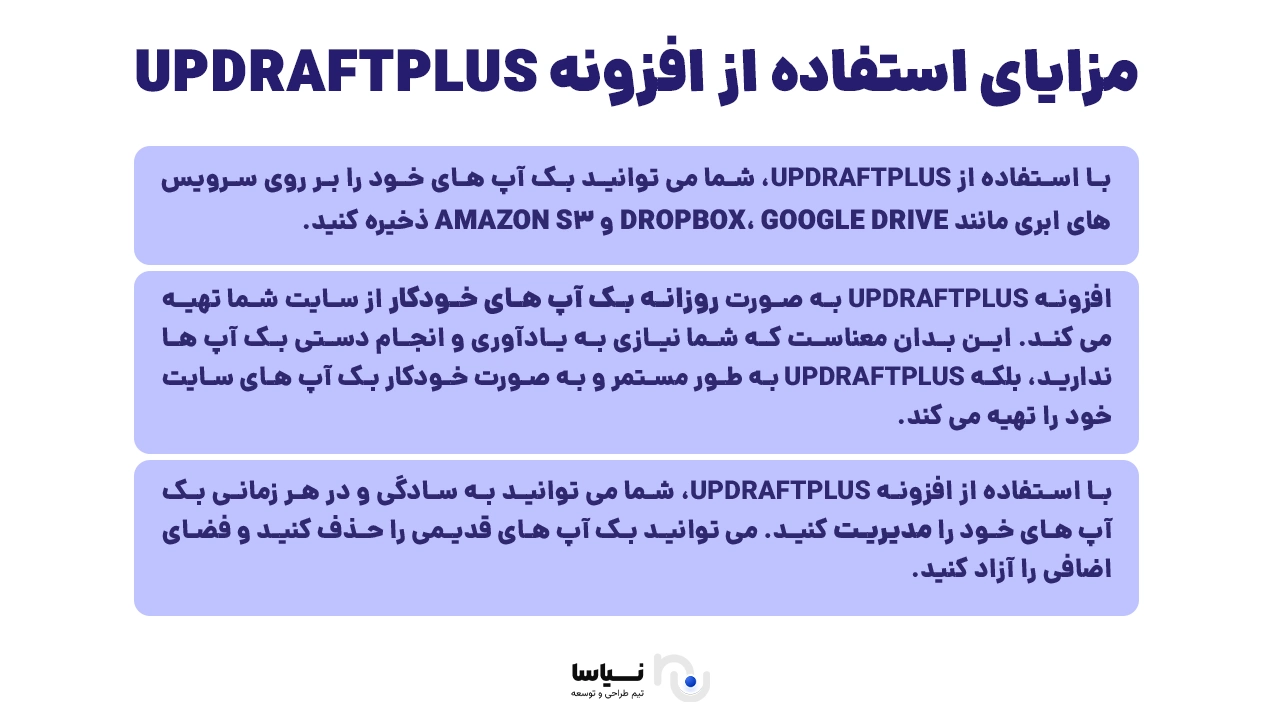
UpdraftPlus is one of the most popular and most powerful WordPress backup plugins. With more than 3 million active installations, it offers wide capabilities such as automatic backups, easy restoration and storing files in the cloud (Google Drive, Dropbox, Amazon S3 and so on).
UpdraftPlus's main advantage is how simple it is to use, and the fact that it comes in both a free and a professional version with more capabilities.
BackupBuddy
BackupBuddy is one of the older and more dependable backup plugins, developed by iThemes. It makes a complete backup of a site possible (files, database, plugins and themes). BackupBuddy can also migrate a site, schedule backups and send copies to services such as Google Drive and Amazon S3.
Duplicator
Although Duplicator is better known as a tool for migrating and copying a site, it is at the same time a powerful backup plugin. It lets users produce a complete package of their site, including all its files and its database.
Duplicator is a professional, efficient choice for web developers and for anyone managing several sites.
WPvivid Backup Plugin
WPvivid is one of the newer but very dependable WordPress backup plugins. A modern interface, cloud support, scheduling and site cloning and migration are among its important capabilities.
It comes in both a free version and a paid one with advanced capabilities.
Jetpack Backup
Jetpack Backup, previously known as VaultPress, is a product of Automattic (WordPress's parent company). It provides real-time backups and is particularly well suited to online shops or sites whose content changes often.
Jetpack Backup costs more than the other options, but its security, quality and support are of a correspondingly high standard.
Backup plugins compared on capability, price and use
Which backup plugin is best for a WordPress site depends on your needs, your budget and your level of expertise. In this section we compare the five plugins introduced above from three main angles — technical capability, price and usability for different users — so as to make the decision simpler.
UpdraftPlus
• Capabilities: automatic backups, quick restoration, cloud storage, file encryption, scheduled backups
• Free version: yes (with complete capabilities, sufficient for an ordinary site)
• Paid version: from about $70 a year
• Suits: every user, from beginner to professional
BackupBuddy
• Capabilities: complete site backup, sending to the cloud, precise scheduling, a site migration tool, malware scanning
• Free version: none
• Paid version: from $99 a year for one site
• Suits: professional users, developers, e-commerce or corporate sites
Duplicator
• Capabilities: a complete backup with an easy installer package, well suited to migrating a site, scheduling in the Pro version
• Free version: yes (usable for most projects)
• Paid version: from $69 a year
• Suits: web designers, anyone migrating a site
WPvivid Backup Plugin
• Capabilities: automatic backups, sending to the cloud, a site migration tool, site cloning
• Free version: yes (with good capabilities)
• Paid version: from $49 a year
• Suits: ordinary users, small to medium sites, independent webmasters
Jetpack Backup (VaultPress)
• Capabilities: real-time backups, one-click restoration, secure storage on WordPress's servers, professional support
• Free version: none
• Paid version: from $9.95 a month (about $120 a year)
• Suits: busy sites, online shops, websites holding sensitive data
The conclusion of the comparison
If you are after a free and complete plugin, UpdraftPlus and WPvivid are excellent options. For professional users, or for businesses needing high security and site migration capabilities, BackupBuddy or Duplicator Pro is recommended. If your main concern is real-time backups and excellent support, Jetpack Backup will be a safe choice. To order a website design, click here
The best WordPress security plugins
Security is one of the most important pillars of any WordPress website. As a popular content management system, WordPress is always exposed to security threats. A powerful security plugin can identify and neutralise many of them. Below we introduce the best and most widely used WordPress security plugins:
Wordfence Security
Wordfence is one of the most popular security plugins, with more than 4 million active installations. It offers a high-level firewall and a powerful malware scanning system. Among its capabilities are:
Scanning files and plugins for malicious code
Blocking suspicious IP addresses
Two-factor authentication
Detailed reports on activity and threats
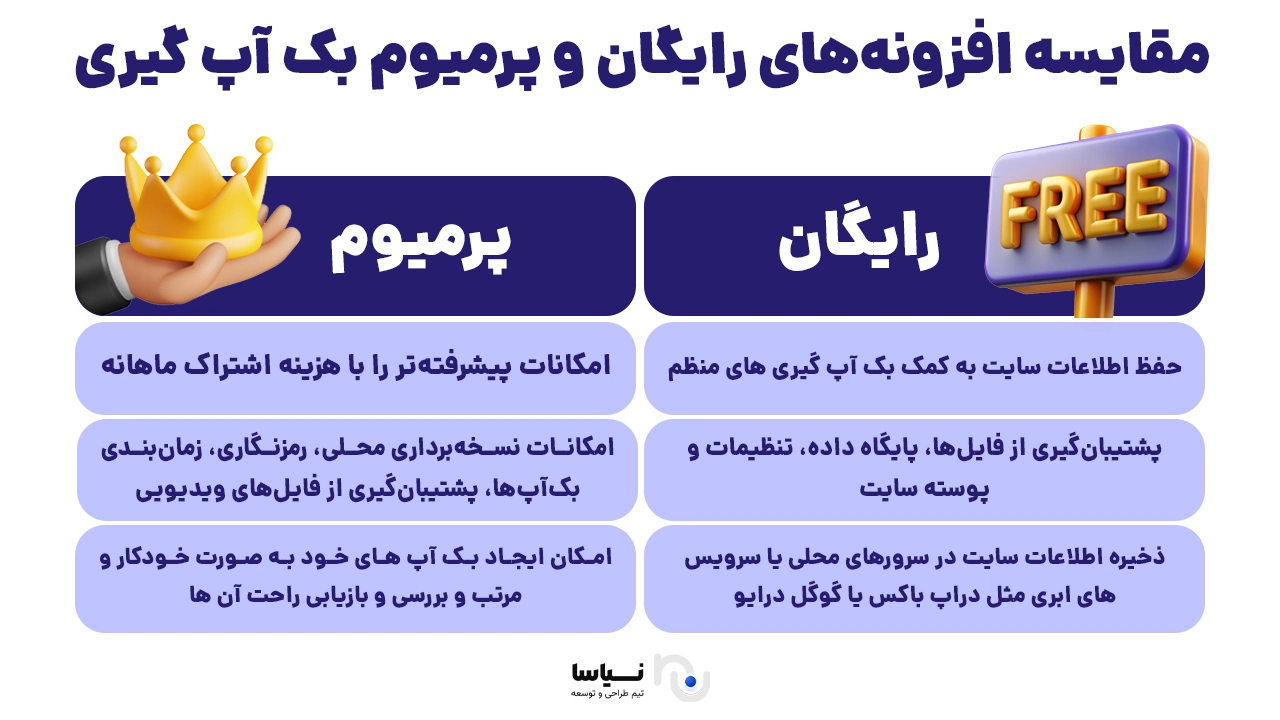
Wordfence's free version has good capabilities and is enough for most sites, but a Pro version with more advanced capabilities is available.
iThemes Security
iThemes Security, with more than 1 million active installations, is another powerful option for securing WordPress sites. It offers capabilities such as:
Limiting failed login attempts
Changing the default login address (wp-login)
Detecting changes to files
Sending security alerts by email
Its Pro version offers capabilities such as two-factor authentication, regular malware checks and scheduled scans.
Sucuri Security
Sucuri is one of the most reputable companies in web security, and its WordPress plugin offers a complete set of protective tools:
A powerful firewall (in the paid version)
Monitoring of user activity
Detecting and removing malware
Event logging
Sucuri is recommended mostly for sites facing more serious threats or holding sensitive information.
All In One WP Security & Firewall
With its simple interface, this plugin suits beginner to intermediate users very well. What it offers includes:
Simple settings for different levels of security (basic, intermediate, advanced)
A built-in firewall
Monitoring of logins and activity
Preventing brute force attacks
This plugin's great advantage is that it is entirely free, with no need for a Pro version to reach most of its capabilities.
MalCare Security
MalCare is a modern, cloud-based plugin that scans for malware without putting a load on your site's server. Among its qualities are:
Automatic malware removal in one click
A firewall and real-time monitoring
A built-in backup for greater security
MalCare is a suitable option for sites that want to stay secure quickly and without complication.
Security plugins compared on capability and ease of use
Choosing the right WordPress security plugin does not depend on the strength of its firewall or its anti-malware capabilities alone; factors such as the interface, the load on the server, the cost and the technical demands on the user also play an important part. In this section we compare the five security plugins introduced above:
Wordfence Security
Capabilities: a high-level firewall, precise malware scanning, IP blocking, two-factor authentication, advanced reporting
Free version: yes (with enough capability for an ordinary site)
Paid version: from $119 a year for one site
Interface: professional but a little crowded for a beginner
Important note: scans run on the site's own server, which may affect weaker sites
iThemes Security
Capabilities: changing the login address, limiting logins, file monitoring, activity logs, two-factor authentication (in the Pro version)
Free version: yes
Paid version: from $99 a year
Interface: simple and suited to semi-professional users
Important note: it has a great many settings, but its built-in guidance makes it easy to manage
Sucuri Security
Capabilities: advanced monitoring, a cloud firewall (in the paid version), activity logging, malware removal
Free version: yes (with basic capabilities)
Paid version: from $199 a year
Interface: minimal and user-friendly
Important note: running on Sucuri's servers reduces the load on your site
All In One WP Security & Firewall
Capabilities: a firewall, login limits, file scanning, security settings at three levels
Free version: yes (and no paid version is needed)
Paid version: none
Interface: very simple and well suited to beginners
Important note: simple as it is, it provides good security for a small site
MalCare Security
Capabilities: a cloud firewall, automatic clean-up, intelligent monitoring, a built-in backup (in the Pro version)
Free version: yes (with limited capabilities)
Paid version: from $99 a year
Interface: modern and very simple
Important note: scans run on MalCare's servers, with no effect on your site's speed
If you are after advanced security with complete reporting, Wordfence or Sucuri is a suitable choice. For beginners, All In One WP Security is a free and dependable option. If you would rather the security work happened off your site and did not weigh it down, MalCare is a good suggestion.
Key points in choosing the right plugin for Iranian sites
Iranian websites, particularly those running on WordPress, face different challenges from international sites. Choosing the right security and backup plugins should be done with the particular needs of Persian-language sites and the conditions of hosting in Iran in mind. Below we look at the important points for choosing well:
Compatibility with Iranian hosting
Many security and backup plugins connect to foreign cloud services such as Google Drive, Amazon S3 or Dropbox. Because some of these are blocked or restricted in Iran, you should choose a plugin that can also store backups on a domestic server or on your own FTP space.
For instance: UpdraftPlus lets you store a backup on your own server or FTP.
Persian language support
A Persian interface makes a plugin simpler to use and configure. Plugins compatible with Persian typefaces and right-to-left layout also give beginners a better experience.
All In One WP Security, for instance, has a good Persian translation and is easier for Iranian users to understand.
Speed and resource use
On domestic shared hosting, using plugins that run scans and security operations on the same server can slow a site down. Plugins such as MalCare or Sucuri, which move that processing to external servers, perform better in this respect.
Domestic support and tutorials
Plugins supported by the Persian WordPress community, or with video tutorials and guides in Persian, are far more useful to Iranian users.
Wordfence and UpdraftPlus, for instance, have complete and abundant tutorials on Iranian websites.
Capabilities without needing to pay in foreign currency
Given how difficult paying in foreign currency is in Iran, plugins that offer enough in their free version, or whose Pro version can be paid for in rials through Iranian marketplaces, are the better choice.
All In One WP Security and UpdraftPlus are very popular in this respect.
How to prevent conflicts between security and backup plugins
One of the common challenges in using security and backup plugins together is a conflict between them. Such conflicts can slow a site down, produce unexpected errors or even stop backups running. To prevent them, the following points are essential:
Install as little as possible, but effectively
There is no need to install several similar plugins. Using two firewalls or two backup plugins at once, for instance, can consume a great deal of resource and cause conflicts over access to files. It is better to choose and use one strong security plugin and one dependable backup plugin.
Set the load order
In some cases you have to set the order in which plugins load, in `wp-config.php` or through a performance management plugin. Security plugins might load first and backup plugins second, for instance, so that the firewall does not prevent the backup plugin from reaching files.
Set exclusions for paths
Some security plugins such as Wordfence may prevent a backup plugin (UpdraftPlus, say) from reaching files or the database. In that case you should define the backup plugin's path as an exclusion in the firewall's settings.
Use official, up-to-date versions
Always use the latest official, legitimate version of a plugin. Old or nulled versions can cause serious incompatibility and disrupt how a site works.
Test in a staging environment
Before running a combination of plugins on your live site, it is recommended that you check how they behave in a test environment (localhost or a subdomain). That prevents sudden errors on the live site.
Continuous reporting and monitoring
Once a plugin is enabled, look at its activity logs and reports over the first few days. If you notice errors such as "Permission Denied" or "Database Access Blocked", there is likely to be a conflict.
Choosing intelligently for a site's security and stability
In today's digital world, security and protecting data matter a great deal. For WordPress sites, security and backup plugins are two fundamental pillars in keeping a site safe and stable. Choosing the right plugins can make a considerable difference to a site's performance, its security and its speed.
Key points in choosing plugins:
Choose plugins to match your site's needs: if your site is small and your resources limited, simple, lightweight plugins can perform better. For more complicated, higher-traffic sites, plugins with more advanced capabilities are essential.
Combine security and backup plugins: the best approach to protecting a site is to use security and backup plugins together. With that combination, if anything goes wrong or an attack occurs, you can return to the earlier state and prevent serious damage.
Pay attention to support and updates: choosing plugins that are updated regularly and have strong support can keep your site secure against new threats.
Check for conflicts and prevent problems: before installing plugins, read their settings and documentation carefully and, if necessary, confirm how they behave in a test environment. That prevents unwanted problems and conflicts.
Conclusion
To keep a WordPress site secure and stable, the right plugins, the right settings and regular backups are essential. Bearing in mind the points set out in this article, you can choose plugins that give your site the best combination of security and performance. In the end, a secure and stable site does not depend on a combination of plugins alone; it also takes continuous care and maintenance.