WordPress is one of the most powerful content management systems for building a website. With WordPress optimisation plugins, you can affect your site's performance and give visitors a better experience.
In this article we look at the best WordPress plugins for optimising your site. From plugins for increasing page load speed, improving on-page SEO and increasing security to caching and database optimisation plugins, we examine them all here.
Why optimising WordPress matters for your website
WordPress is one of the most popular content management systems in the world and, with its range of plugins, lets you optimise your website and improve how it performs. Optimising WordPress matters for your website because of the following advantages:
Better page load speed:
One of the important factors in ranking in search engines is a website's page load speed. Using WordPress optimisation plugins, you can improve your pages' load times and give visitors a better experience.
**post@12*/
A higher ranking in search engines:
Optimising WordPress helps you optimise your website's pages for search engines and reach a higher position in Google's results. Using WordPress SEO plugins such as Yoast SEO and All in One SEO Pack, you can improve your metadata, your keywords and your link structure and set your website apart from your competitors.
Ease of use and management:
WordPress is very simple and user-friendly for running a website. WordPress optimisation plugins let you enable and configure a range of optimisations and help you manage the process readily.
Broadly, optimising WordPress matters for your website because of its effectiveness and the ease with which it is managed, because of better page load speed and because of a higher ranking in search engines. Using WordPress optimisation and management plugins, you can give visitors a better experience and put your website ahead of your competitors. To see the rates for specialist web design, visit the link.
**post@8*/
The best WordPress plugins for increasing a site's speed
WP Rocket and its effect on loading pages faster
To improve the load speed of your WordPress pages, WP Rocket is one of the best choices. With it you can improve how pages load and improve users' experience. By applying a range of optimisations — caching, compressing HTML and CSS, improving images and static files and optimising how a website's resources load — WP Rocket increases page load speed.
WP Rocket's notable capabilities include optimising the cache, running JavaScript and CSS efficiently, lazy loading for images and compressing HTML and CSS. Combining all of these, it makes pages load faster and better for users.
W3 Total Cache and optimising static files
W3 Total Cache is another popular plugin for optimising and increasing the load speed of WordPress pages. By enabling W3 Total Cache, you can improve your website's static files and content and reduce load times sharply.
The plugin uses caching to strengthen a website's performance and, with a range of techniques such as compressing content, images and CSS and JavaScript files, optimising the delivery of the cache and making other improvements, contributes to your website's speed and efficiency.
Using W3 Total Cache, you can load your website's pages remarkably quickly and improve users' experience.
Plugins for reducing image size and optimising a site's images
Optimising images addresses an important detail of improving a website's load speed. The faster images load, the better users' experience and the higher your site's ranking in search engines. To that end, image compression and optimisation plugins can help you.
Optimising images with the Smush plugin
Smush is one of the best plugins for reducing image size and optimising images in WordPress. With it, you can reduce the size of your images without a loss of quality. Smush automatically optimises every image uploaded to your website and reduces its size without a negative effect on quality.
Smush also lets you optimise images in bulk, so that in one click you can save a great deal of the time spent on optimising images.
EWWW Image Optimizer for improving image load times
EWWW Image Optimizer is another popular and efficient plugin for optimising images in WordPress. Using advanced algorithms, it preserves your images' quality while reducing their size to a minimum.
Improving image load times bears directly on a website's speed and efficiency, and with EWWW Image Optimizer you can improve it.
With Smush and EWWW Image Optimizer, you can readily optimise your website's images and improve their load speed. These plugins help you reduce image sizes without a loss of quality and improve users' experience.

Increasing a website's security with security plugins
Given the continuing growth of cyber attacks and security threats, protecting your website is vital. Using security plugins in WordPress can help you guard against security weaknesses and protect your website against malicious attacks.
One of the notable security plugins for WordPress is Wordfence Security. It offers capabilities such as analysing a website's security, preventing spam attacks and scanning automatically to identify security threats. With Wordfence Security, you can protect your website against unplanned attacks, DDoS attacks, brute force and other security threats.
Another plugin well known in website security is Sucuri Security. It offers capabilities for increasing your site's security, among them security analysis, monitoring vulnerable points and preventing attacks. With Sucuri Security, you can protect your website against malicious spam and DDoS attacks.
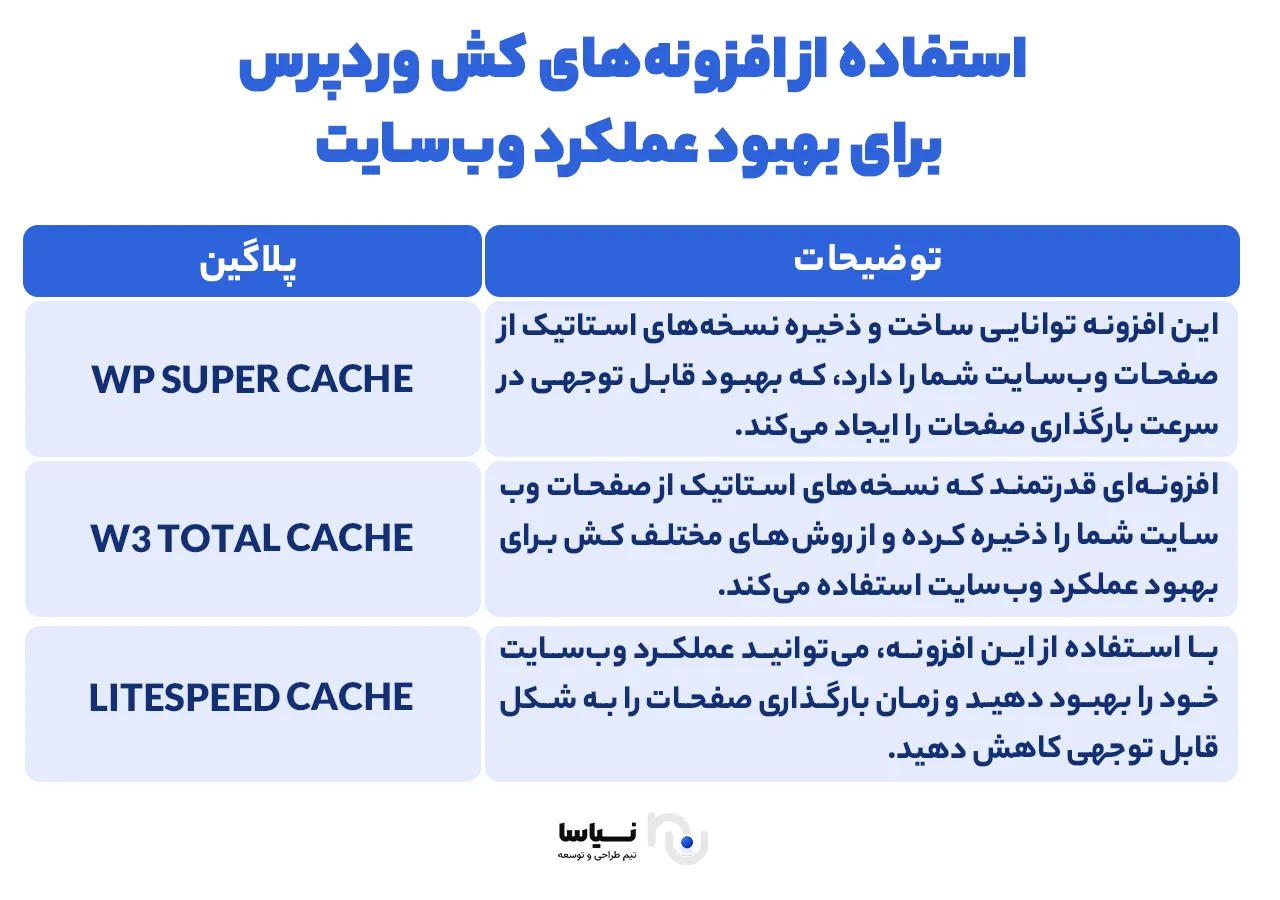
Using WordPress caching plugins to improve a website's performance
One of the effective ways of improving your website's performance is to use WordPress caching plugins. They can store static versions of a website's pages and so reduce page load times considerably. With them, when a user reaches a page on your website, the information needed (images and templates, for instance) is taken from the stored static version and sent quickly to the user's browser. That reduces the number of requests to your server and shortens page load times.
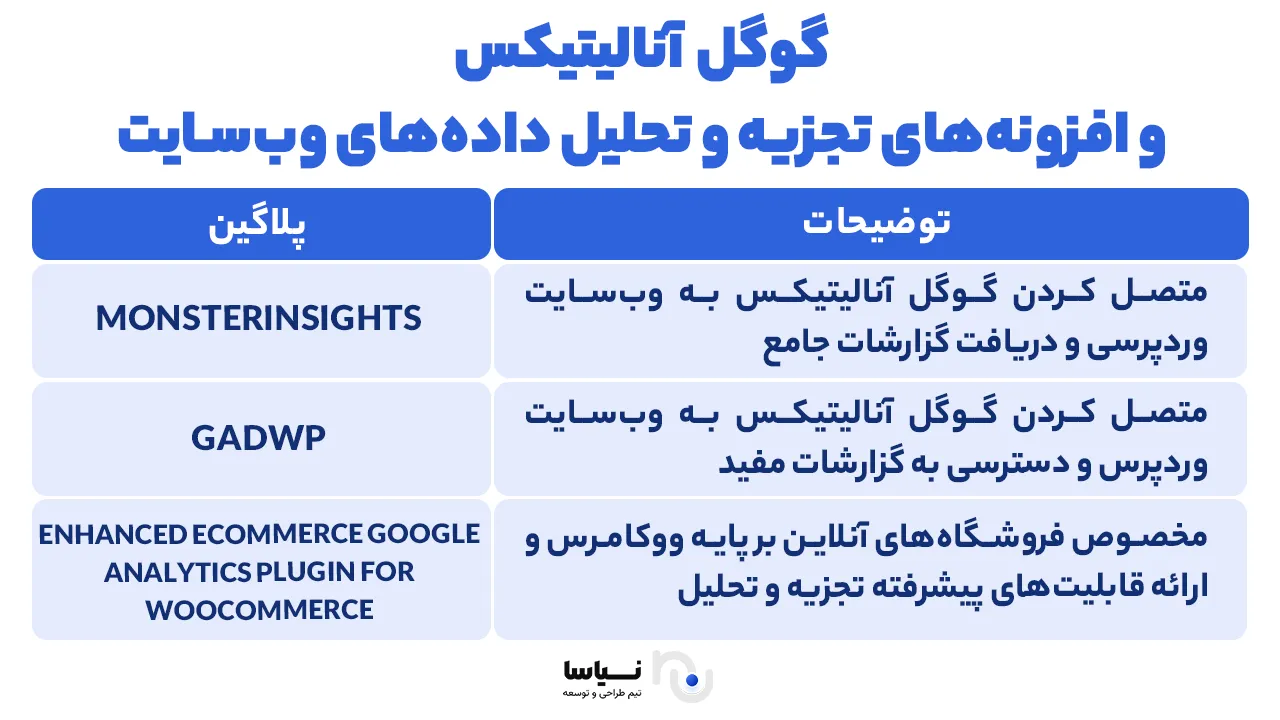
Google Analytics and website data analysis plugins
This section looks at Google Analytics and at website data analysis plugins. Google Analytics is one of the well-known and very powerful tools for gathering and analysing a website's data.
It lets you follow users' activity on your website and receive precise statistics and reports. Using data analysis plugins, you can also learn more about your website's visitors and take effective steps to improve your site's ranking and its weak points.
Some of the well-known website data analysis plugins are:
MonsterInsights: This plugin lets you connect Google Analytics to your WordPress website and receive thorough reports about your visitors and their behaviour. It also lets you readily examine events, outbound links and other statistics.
Google Analytics Dashboard for WP (GADWP): This plugin likewise lets you connect Google Analytics to your website and reach useful reports about how it performs. You can also see and analyse various activity in the WordPress dashboard.
Enhanced Ecommerce Google Analytics Plugin for WooCommerce: This plugin is designed particularly for online shops built on WooCommerce and provides advanced capabilities for marketing and refining your online shop.
A website's interface and the part UI/UX design plugins play
In optimising a website, the interface (UI) and the user experience (UX) matter a great deal. UI/UX design plugins in WordPress also play an important part in improving a website's interface and user experience.
With UI/UX design plugins, you will be able to update your website's appearance and interface simply and without any programming skill and so make your website more appealing and more user-friendly.
UI/UX design plugins give you capabilities that help you design a website's interface. They may include adding and editing design elements such as buttons, menus, forms and widgets. With UI/UX plugins, you will also be able to add animation, effects and other settings of your choice to your website's interface.
UI/UX design plugins can also give you capabilities for improving a website's user experience. They may include page load speed, better responsiveness across devices, search engine optimisation and better image quality.
Using UI/UX design plugins can therefore help you improve your website's interface and user experience and give it a more appealing and professional appearance.
The effect of WordPress form builder plugins on engaging with users
Using form builder plugins in WordPress can have a considerable effect on how you engage with your website's users. They let you customise forms and make it possible to create appealing, practical forms so that users can readily get in touch with you.
The positive effect of these plugins on engaging with users is considerable. By creating customisable forms, you can gather the information you need from users and stay in touch with them readily. Beautifully designed, user-friendly forms can also lead users to complete and submit a form and are effective in increasing conversion and reaching new customers.
With a form builder plugin, make sure it has capabilities such as validating information, sending emails to users automatically and connecting to a range of software platforms. Use the plugins available and take advantage of the capabilities you need for engaging with users.
Improving a user's buying experience with WordPress's WooCommerce plugins
If you have an online shop or intend to set one up, you will certainly need a shop management system on your website. Here we introduce a powerful piece of software for running an online shop on WordPress: WooCommerce. This plugin turns WordPress into a professional online shop system and gives you a great many capabilities.
With WooCommerce plugins, you will be able to present your products readily, process orders simply and give your customers an easy, quick buying experience. The plugin also lets you provide secure payment for your customers through a range of payment gateways.
Beyond that, WooCommerce has a great many add-ons that can improve your users' buying experience. Using advanced SEO plugins, for instance, you can improve the ranking of your product videos in search engines and improve their SEO score in Google's and Bing's search results.
The security plugins available for WooCommerce can also help you be sure of your online shop's security.