A personal site or blog: the simplest kind of site with WordPress
A corporate site: presenting services and reaching potential customers
A corporate site: presenting services and reaching potential customers
A news or magazine site: suited to media and content writers
A portfolio site: for designers, photographers and freelancers
An educational site: offering online courses with plugins such as LearnDash
A membership site: offering special content to registered users
A classifieds site: building online marketplaces and sites like Divar
A forum site: building an online community with plugins such as bbPress
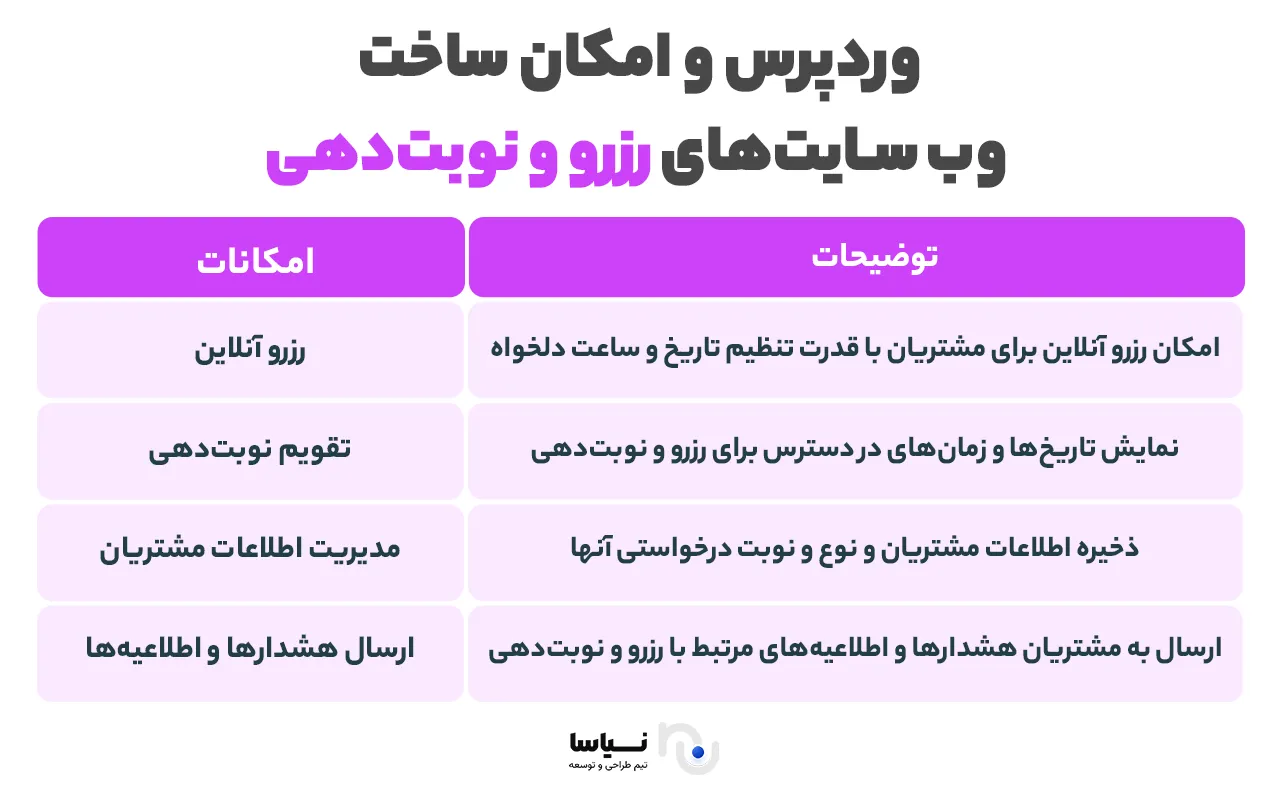
A booking and appointment site: suited to doctors, salons and consultants
A booking and appointment site: suited to doctors, salons and consultants
A property site: showing and managing property listings
A medical and clinic site: presenting treatments and taking appointments
A multilingual site: offering content in a range of languages
An event and conference site: presentation, registration and ticket sales
An auction site: building platforms for selling to the highest bidder
A photo or art gallery site: suited to artists and photographers
A personal site and online CV: presenting your career and your skills
Frequently asked questions about building a site with WordPress
WordPress is one of the most popular content management systems (CMSs) in the world, and millions of sites have been built with it, from personal blogs to large online shops. That popularity is no accident; it comes from great flexibility, ease of use, wide support and the thousands of themes and plugins that let users carry out professional web design in the simplest possible way. If we want to build professional, fast and scalable sites with a single powerful tool, WordPress is one of the best choices.
WordPress is free, open-source software used for designing and running websites. The platform was first built for blogging, but over time, as its capabilities developed, it became an all-purpose tool for building any kind of site. Among WordPress's key advantages are the following:
Easy, quick installation
A simple, user-friendly interface
Thousands of plugins for adding new capabilities
A range of themes that can be customised
An active user community and abundant learning resources
Good SEO and accord with search engines
These qualities have made WordPress a suitable choice for beginners and professionals alike.
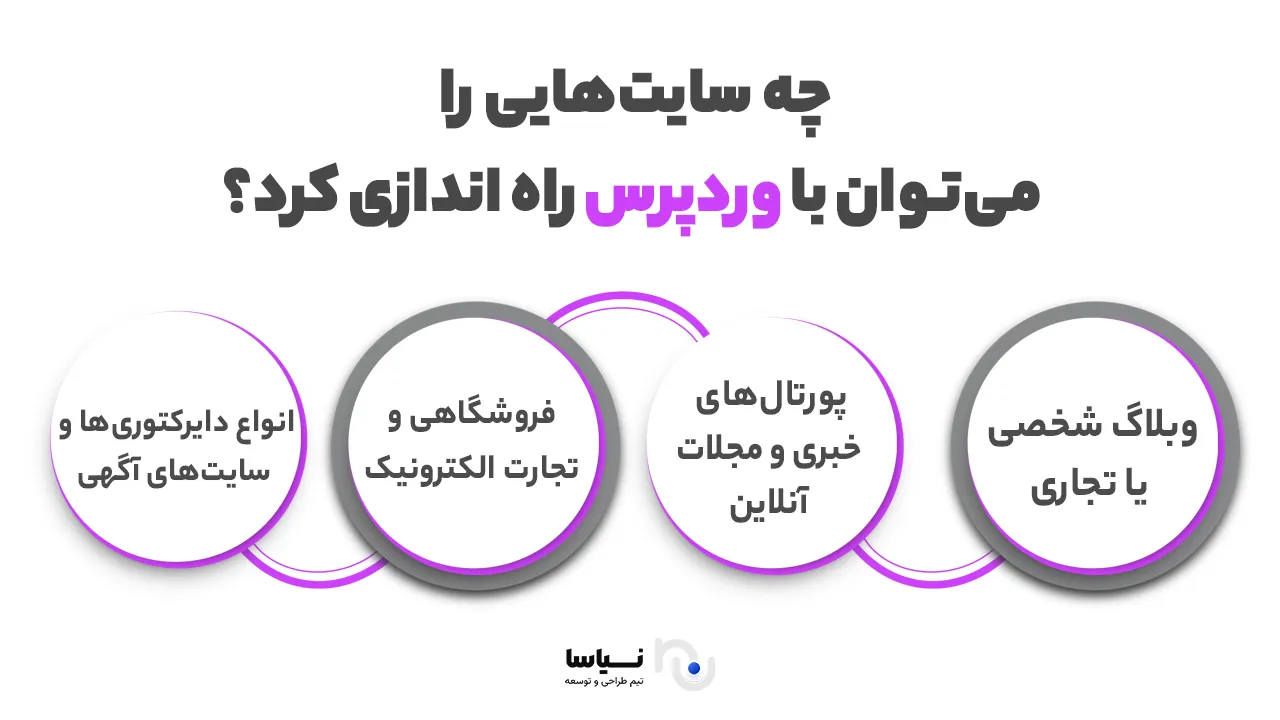
A personal site or blog: the simplest kind of site with WordPress
If someone wants a website to present themselves, to share their experience or to write specialist or everyday pieces, WordPress is an ideal option. Many writers, designers, photographers and even students use WordPress to build a blog or a personal site. Capabilities such as categorising posts, tagging, surveys and publishing posts readily have made WordPress one of the most popular tools for bloggers. Using ready-made themes, a site's appearance can also be set to match your taste or your field.
A corporate site: presenting services and reaching potential customers
WordPress is an excellent platform for building corporate websites. Sites of this kind usually include pages such as "about us", "services", "contact us" and "articles". Using professional themes and dedicated plugins, a modern, fast and responsive corporate site can readily be designed. Contact forms, live chat, project presentations, portfolios and even a payment gateway for consultancy services or simple products can also be added. For businesses looking for a serious presence online, WordPress is an economical and dependable option.
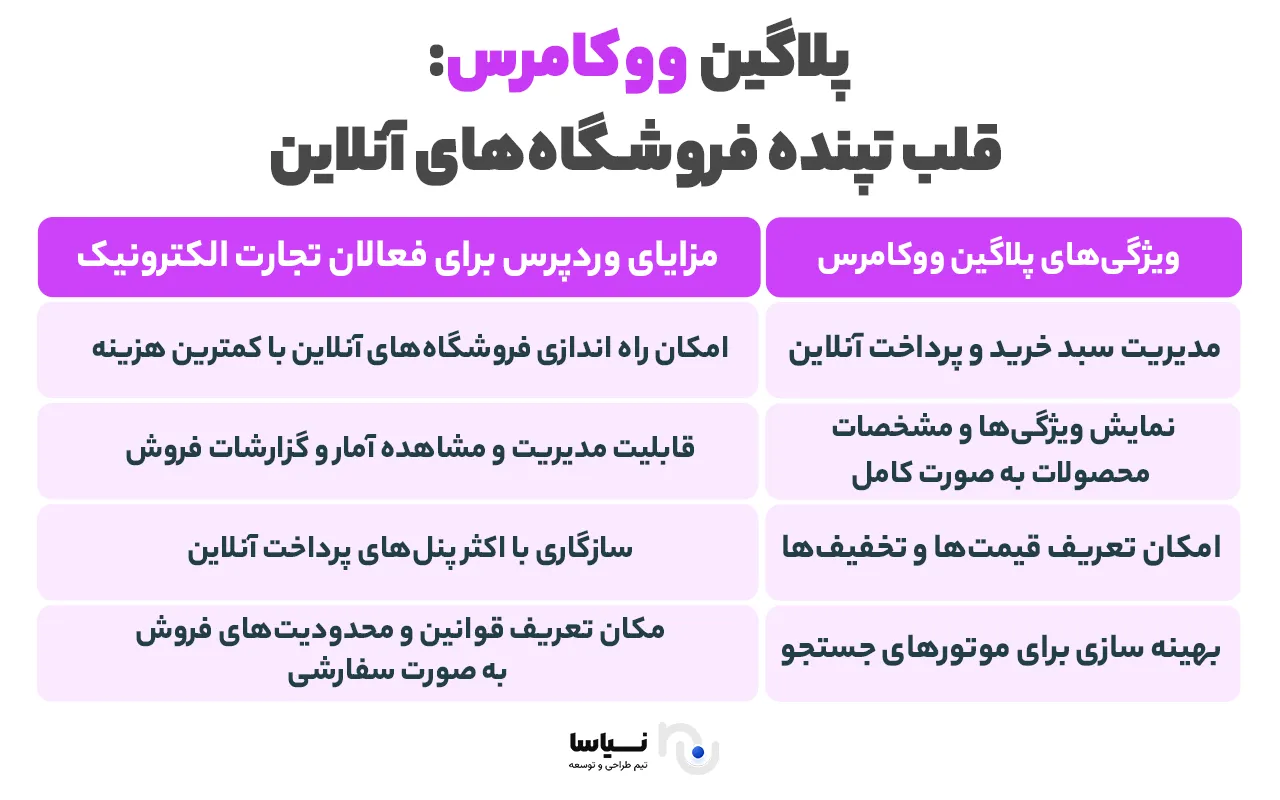
An e-commerce site: building an online shop with plugins such as WooCommerce
With the powerful WooCommerce plugin, WordPress becomes a complete e-commerce platform. It lets you put physical or digital products of every kind up for sale, manage stock, apply discounts and even add a bank or intermediary payment gateway (ZarinPal or IDPay, for instance). With dedicated e-commerce themes and plugins for capabilities such as postal delivery, a basket, order tracking and invoicing, a professional shop can be built with WordPress without any knowledge of programming.
A news or magazine site: suited to media and content writers
WordPress is one of the most popular platforms for building news, analysis and magazine sites. Capabilities such as advanced categorisation, filtering news, scheduled publishing, managing several authors and SEO optimisation have led many online media to turn to WordPress. Professional news themes along with plugins such as Elementor or WPBakery make it possible to design appealing, responsive pages. Showing advertising and earning revenue can also readily be built into sites of this kind.
A portfolio site: for designers, photographers and freelancers
People working in fields such as graphic design, photography, architecture, programming or content production need a professional portfolio website. WordPress makes it possible to present completed projects with descriptions, images and even videos in an orderly, beautiful way.
Using portfolio themes and plugins for building image galleries or sliders, an appealing site for presenting your skills and winning customers' trust can be built in a short time.
An educational site: offering online courses with plugins such as LearnDash
As online learning has grown, building educational websites has become a fundamental need, and WordPress has a great deal to offer here too. Plugins such as LearnDash, Tutor LMS and LifterLMS make it possible to build video courses, online tests, completion certificates and a user registration system into your site readily.
Sites of this kind can be free or paid, and with payment gateways selling courses is straightforward. WordPress is an excellent choice for teachers, training institutes and specialists who want to sell their knowledge.
A membership site: offering special content to registered users
WordPress makes it possible to build sites where only members can reach parts of the content. Using plugins such as MemberPress, Restrict Content Pro or Paid Memberships Pro, different levels of access can be defined, special content locked, and even a subscription fee charged.
Sites of this kind are very useful for particular kinds of teaching, for specialist material, for customer clubs, or for offering valuable downloadable files. Reporting, subscription renewals and automatic notifications can also readily be managed.
A classifieds site: building online marketplaces and sites like Divar
With WordPress you can build sites like Divar, Sheypoor or Bama on which users can post listings. Plugins such as Classified Listing or WPAdverts provide capabilities such as users posting listings, setting categories, adding photographs and locations, paying for a featured listing and advanced search. This kind of site is widely used for earning revenue from advertising and listing fees and can be designed for particular fields such as property, cars, employment or selling goods.
A forum site: building an online community with plugins such as bbPress
If you are looking to create a space for conversation, for exchanging views or for supporting users, WordPress, with plugins such as bbPress and BuddyPress, can be a good platform for building online forums.
Sites of this kind are ideal for building specialist forums, interest groups, customer clubs or product support. Users can join, start new topics, reply to discussions and build social engagement. Building a forum with WordPress is far simpler and faster than with more complicated systems such as phpBB or vBulletin.
A booking and appointment site: suited to doctors, salons and consultants
With plugins such as Bookly, Amelia or WP Simple Booking Calendar, WordPress makes it possible to build sites with a booking and appointment system. Sites of this kind suit businesses that need to schedule appointments: medical clinics, beauty salons, training institutes, private tutors or consultants. Users can choose the date and time they want, pay for the service online and receive a confirmation. That saves time and improves the user's experience.
A restaurant and café site: presenting a menu, booking a table and ordering online
WordPress makes it possible to set up an elegant, practical website for restaurants, cafés and fast-food outlets. Sites of this kind usually include the menu, opening hours, contact details, an image gallery and even the ability to book a table or order food online.
With plugins such as Five Star Restaurant Menu, GloriaFood or Restaurant Reservations, ordering and booking systems can readily be built. Restaurant themes also have an appealing, professional appearance that improves the user's experience and helps attract customers.
A property site: showing and managing property listings
WordPress is a powerful option for building estate agents' websites or platforms for buying and selling houses and flats. Using plugins such as Estatik, Real Estate Manager or WP Real Estate Pro, you can add a property listing, advanced search by location, price and floor area, Google Maps and a contact form for an agent. Users can list their own property, upload photographs and full details, and even pay to have their listing featured. Sites of this kind can be extended a great deal.
A medical and clinic site: presenting treatments and taking appointments
For surgeries, clinics and treatment centres, WordPress provides a good platform for building a professional, beautiful and efficient site. Such sites can include an introduction to the doctor or doctors, their specialisms, the services offered, the insurers they work with, the location and an appointment booking form.
Plugins such as Bookly or Amelia add careful appointment management, SMS reminders and even online payment. WordPress's medical themes generally have a clean, dependable and user-friendly design that conveys confidence to visitors.
A multilingual site: offering content in a range of languages
If your audience is in a range of countries, or your business needs to operate in several languages, WordPress makes building multilingual sites straightforward. Plugins such as WPML, Polylang or TranslatePress let you have a separate version of your pages, articles and products in each language.
That is essential for international companies, for educational websites and for sites with a varied target market. Users can also switch language instantly, which gives an entirely localised experience.
An event and conference site: presentation, registration and ticket sales
WordPress is one of the best options for building sites devoted to events, seminars, webinars and conferences. With plugins such as The Events Calendar, Event Espresso or EventON, you can add an events calendar, full details of each programme, online registration and ticket sales.
Sites of this kind suit organisers of educational conferences, exhibitions, festivals and specialist workshops. An email notification system and reminders for participants can also be used.
An auction site: building platforms for selling to the highest bidder
If you intend to build a site like an online auction such as eBay, WordPress, with plugins such as Ultimate Auction or Auctions for WooCommerce, gives you what you need. Users can take part in auctions, place their bid and become the final winner.
Managing the auction's closing time, the reserve price, recording the winner automatically and online payment are also among such a site's capabilities. This model is widely used for selling particular, artistic or collectible items and even for particular kinds of rental.
A photo or art gallery site: suited to artists and photographers
With gallery themes and plugins such as NextGEN Gallery, Envira Gallery or FooGallery, WordPress provides an excellent platform for presenting art and photography. Sites of this kind can have categorised galleries, professional sliders and beautiful effects for displaying images. Photographers, graphic designers, painters and even architects can use these capabilities to present their work professionally. The ability to sell work or to download digital files can also be added.
A personal site and online CV: presenting your career and your skills
Building a personal site to present yourself, your skills, your career, your work and how to reach you is one of WordPress's most popular uses. With light, minimal themes, a professional, dependable online CV can be designed that has a considerable effect in attracting job opportunities.
Plugins such as Resume Builder or themes such as Astra and OceanWP make building such a site quick and simple. A contact form, links to social networks and a downloadable PDF CV can also be added.
Frequently asked questions about building a site with WordPress
This section answers the questions you will meet on the way to building your own site.
Can any kind of site be designed with WordPress?
Yes. WordPress is a powerful, flexible and extensible content management system that, with themes and plugins, makes it possible to build a wide range of sites — from personal and news sites to online shops, online learning, medical services, tourism, appointment booking, online auctions and even multi-purpose platforms.
What is the difference between WordPress.com and WordPress.org?
WordPress.com is a hosted service with limits on the themes and plugins you can reach, but it suits beginners. WordPress.org, by contrast, is the complete open-source version of WordPress, installed on your own hosting, providing full capabilities including installing any plugin and designing as you wish. If your aim is professional design and a great deal of customisation, WordPress.org is recommended.
Do I have to know how to program to use WordPress?
No. Using WordPress takes no knowledge of programming. Its simple interface, its visual editor and the range of ready-made plugins and themes mean that even people with no technical experience can design beautiful sites. If you are after a particular design and advanced development, though, familiarity with HTML, CSS or PHP will help.
How secure are WordPress sites?
Kept up to date and using reputable plugins and themes, WordPress is very secure. Plugins such as Wordfence, iThemes Security or Sucuri are also recommended for increasing a site's security. Observing simple points such as choosing a strong password, using an SSL certificate, limiting logins and taking regular backups is also very effective.
What does it cost to set up a site with WordPress?
The cost of setting up a site with WordPress depends on a number of things. WordPress itself is free, but you have to obtain hosting, a domain and, if you need them, commercial themes or plugins. Roughly:
Hosting: from 50,000 to 500,000 toman a year
A .ir domain: about 50,000 toman a year
Professional themes or plugins: from 200,000 toman to several million (optional)
Altogether, between 500,000 and 2 million toman is enough to set up a simple site.
Can a multilingual site be built with WordPress?
Yes. With plugins such as WPML, Polylang and TranslatePress, WordPress makes building a multilingual site possible. They let you create a separate version of your pages, articles and even products in each language. You can also set a default language and let the user choose one.
Does WordPress suit e-commerce sites?
Entirely. With the powerful WooCommerce plugin, WordPress makes it possible to build a professional online shop with capabilities such as stock management, product categories, a basket, online payment, shipping, discounts, discount codes and sales reporting. Thousands of additional plugins are also available for extending a shop's capabilities.
Does WordPress suit high-traffic sites?
Yes, provided the site is properly optimised and uses suitable hosting. Using caching plugins such as WP Rocket, CDNs such as Cloudflare and powerful hosting can guarantee the speed and stability of a high-traffic site. Many notable sites around the world with millions of daily visits also use WordPress.
Who does WordPress not suit?
WordPress is a suitable option for 90% of online projects. If your project is entirely bespoke, though, with complicated logic and a different structure (a social network with a particular structure, or particular web-based software), frameworks such as Laravel or Django may be a better choice. Even for such projects, though, WordPress can be used alongside them (for a blog, a news section or content management).
Can a WordPress site be extended and customised?
Entirely. WordPress is open-source, meaning you can edit or customise its core, its themes and its plugins. Developers can add new capabilities to a site, change its appearance completely and even write bespoke plugins. That quality makes WordPress a flexible, professional option for a growing business.
How do I start my site with WordPress?
To begin:
Obtain hosting and a domain.
Install WordPress on the hosting (many hosts install it automatically).
Choose and install the theme you want.
Enable the plugins you need.
Build the site's main pages: home, contact, about, services and so on.
Enter the site's content and publish it.
In the later stages you can improve its appearance, add more plugins and improve the site's SEO.
A final summary: why WordPress is the best option for building a site
WordPress is more than a content management system; it is a flexible, wide-ranging and dependable tool on which millions of sites around the world have been built. In this article we have looked at the kinds of site that can be designed with WordPress: from personal blogs to online shops, educational, news, medical, consultancy and corporate sites, and even multi-purpose, high-traffic platforms. What sets WordPress apart from the alternatives is a powerful combination of ease of use, unlimited scope for extension, abundant learning and support resources and economical costs. It suits beginners who want to set up a site without technical knowledge and professional developers looking to build complicated, bespoke sites alike.
If you are looking for a quick, economical and dependable way of being present online, WordPress is one of the best possible choices. You need only establish your aim, choose the right theme and plugins, and enter the appealing world of web design with WordPress. Remember: your site's success does not depend on its platform alone but on good content, a sound user experience and continuous attention to what users need. WordPress puts the tool in your hands; creativity and planning turn it into success.