
What does increasing a site's speed mean?
Why is a site sometimes slow?
Why does a site's load speed matter?
The most important factors in a site's load speed
What to do to increase a site's load speed
How to test your site's speed
Useful plugins for increasing a site's speed in WordPress
Using the right hosting to increase a site's speed
It makes no difference whether you have an online shop or an educational blog; improving a site's load speed is an unavoidable requirement of success. In today's fast-moving world, users who will wait only a few seconds for a page to load will leave immediately if a site is slow and go to a competitor. If you are looking to increase your traffic, reduce your bounce rate and improve your site's position in Google, then, one road lies ahead of you: improving your site's load speed. So how can that speed be increased? The good news is that with a set of entirely practical, tested measures — using a caching plugin, choosing the right hosting and optimising images — you can raise your site's load speed strikingly. In this article on the Niasa website we look step by step at the most important ways of increasing a site's load speed, from the basic principles to professional performance analysis tools. This guide can be a complete roadmap for any site owner, beginner or professional. If you are looking to reach more users and improve your SEO, then, stay with us to the end.
What does increasing a site's speed mean?
Increasing a site's speed means, simply, shortening the time it takes for web pages to load. When a user enters your site's address or clicks a link, their browser has to receive the information for that page from your server and display it. If that takes too long, the user will probably give up and close the page.
But what exactly does increasing a site's speed cover?
Reducing the initial page load time: this means your home page or landing page loading completely within the first few seconds.
A fast server response time: the time your server takes to answer a user's request.
Greater interactivity: even if part of the site has not yet loaded, the user can interact with the content they can see.
A better user experience (UX): high speed equals a better feeling about your site.
Why is a site sometimes slow?
A site is slow for a great many reasons, among them:
Using poor-quality hosting
Installing a great many unnecessary plugins
Not optimising images and code
Using heavy, non-standard themes
No caching system or CDN
Why does a site's load speed matter?
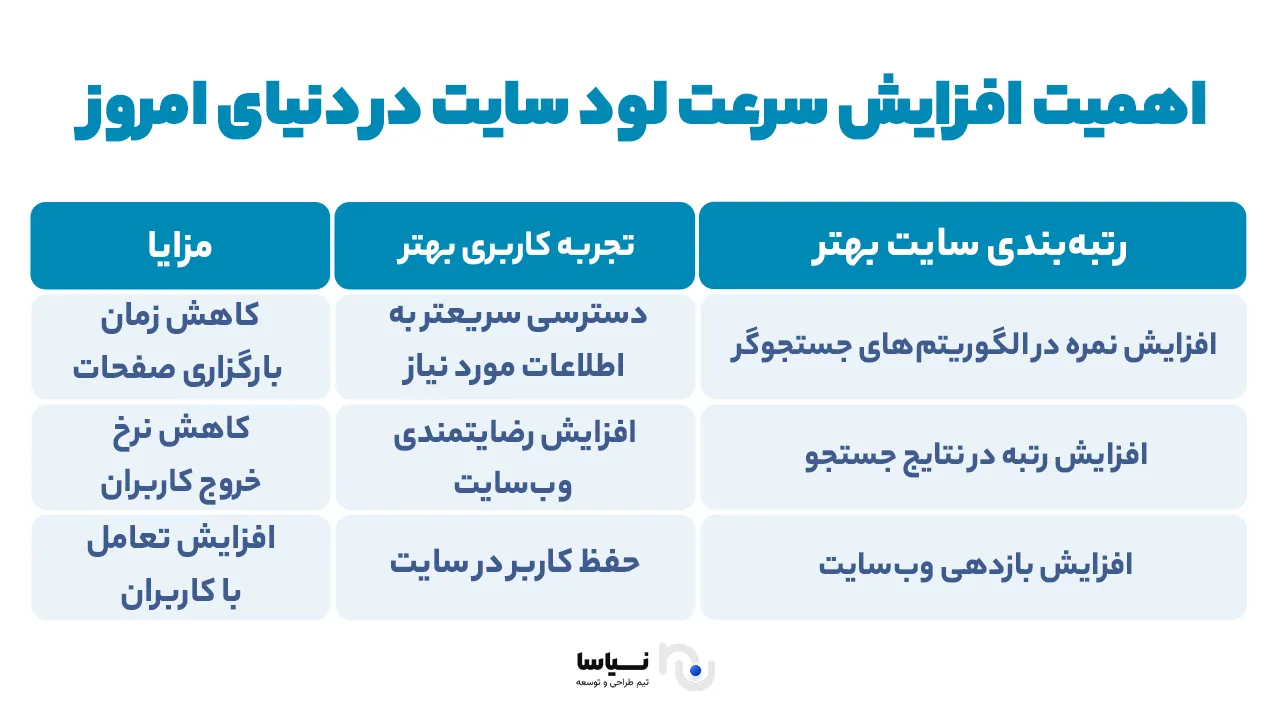
Increasing a site's load speed is not merely a good quality to have; it is a vital necessity for the online success of any business, shop or blog. Today's user expects a site to open in under 3 seconds. If that expectation is not met, they will readily go to a competitor.
1 – A better user experience (UX)
When a site loads quickly, a user can see the information they want, buy, or fill in a form without wasting time. High speed conveys to an audience that a site is professional.
2 – A higher conversion rate
A site that opens quickly leads more users to buy or to stay on it. According to research by Amazon, every second of delay in a site's loading can reduce sales by up to 7%.
3 – A lower bounce rate
Users flee sites that open slowly. Increasing a site's load speed bears directly on reducing the bounce rate.
4 – Better SEO
One of Google's important factors in ranking sites is their load speed. A site that loads slowly has less chance of appearing on the first page of search results. The best thing for a fast, user-friendly site is a bespoke website design; but if you have invested in a bespoke design and pay no attention to its load speed, you have effectively wasted part of your budget.
5 – More returning users
If users have a good experience of a site's speed, they are far more likely to visit it again.
In what follows we look more closely at how we can gain these advantages and by what means we can improve a site's load speed.
The most important factors in a site's load speed
To improve a site's speed properly, we first have to identify what affects it. Each of these factors, if not managed properly, can slow a site down and so give a poor user experience. The key factors in a site's speed are:
1 – Server response time (TTFB – time to first byte)
Server response time, or TTFB, is the time a server needs to send the first byte of data to a browser. The lower the TTFB, the faster the server is working and the shorter the site's load time.
2 – The kind and quality of the hosting
Choosing the right hosting is one of the vital factors in improving a site's speed. Using low-quality shared hosting can have a considerable negative effect. Professional hosting suited to content management systems such as WordPress generally performs better and improves a site's load speed.
3 – The size of images and files
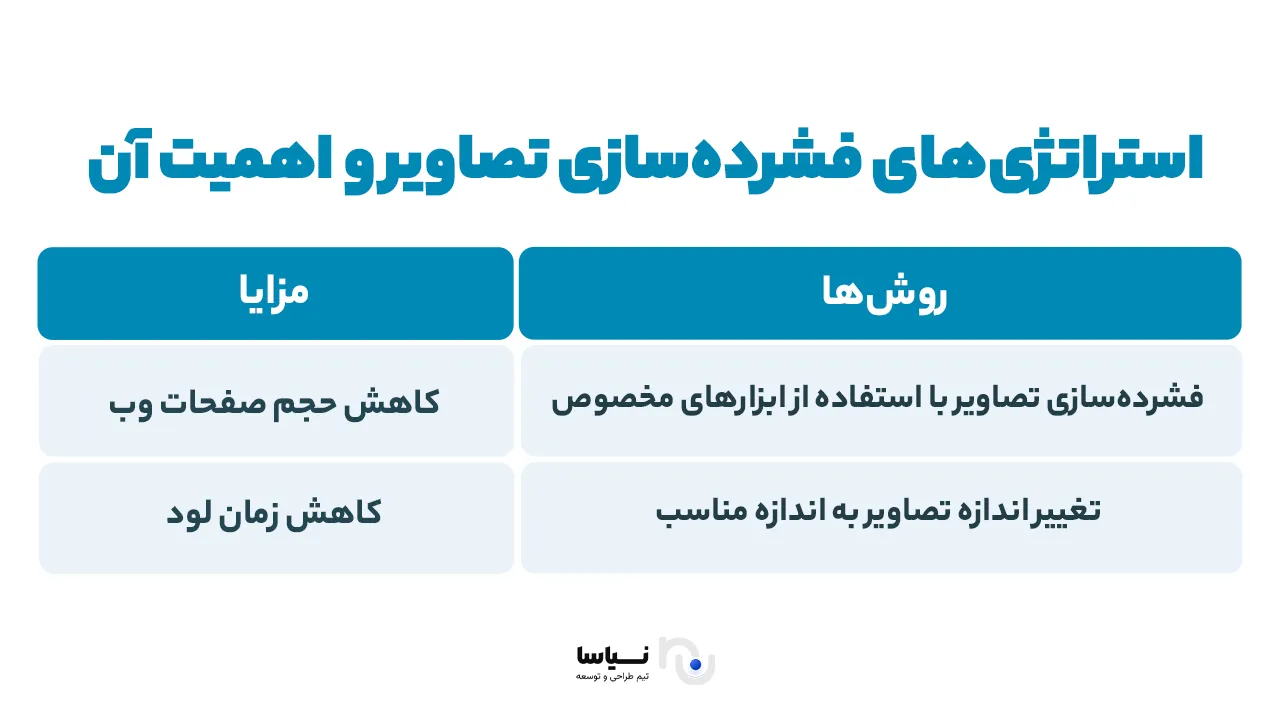
Loading heavy images and unoptimised files is one of the main reasons a site is slow. Reducing the size of images without a loss of quality will have a striking effect on a site's page load speed.
4 – CSS, JavaScript and HTML
The code for styles (CSS), scripts (JavaScript) and the HTML structure should be properly optimised, compressed and, where necessary, combined. Otherwise these files can delay a page's loading and slow a site down.
5 – Using a cache
A caching system stores frequently used information in the browser's or the server's memory, so that on later visits that information is read from the cache without having to be loaded again from the server. That can increase a site's speed considerably.
6 – Using a CDN (content delivery network)
Using a CDN means distributing static files such as images and scripts across servers close to users' locations. That reduces load time and improves a site's speed.
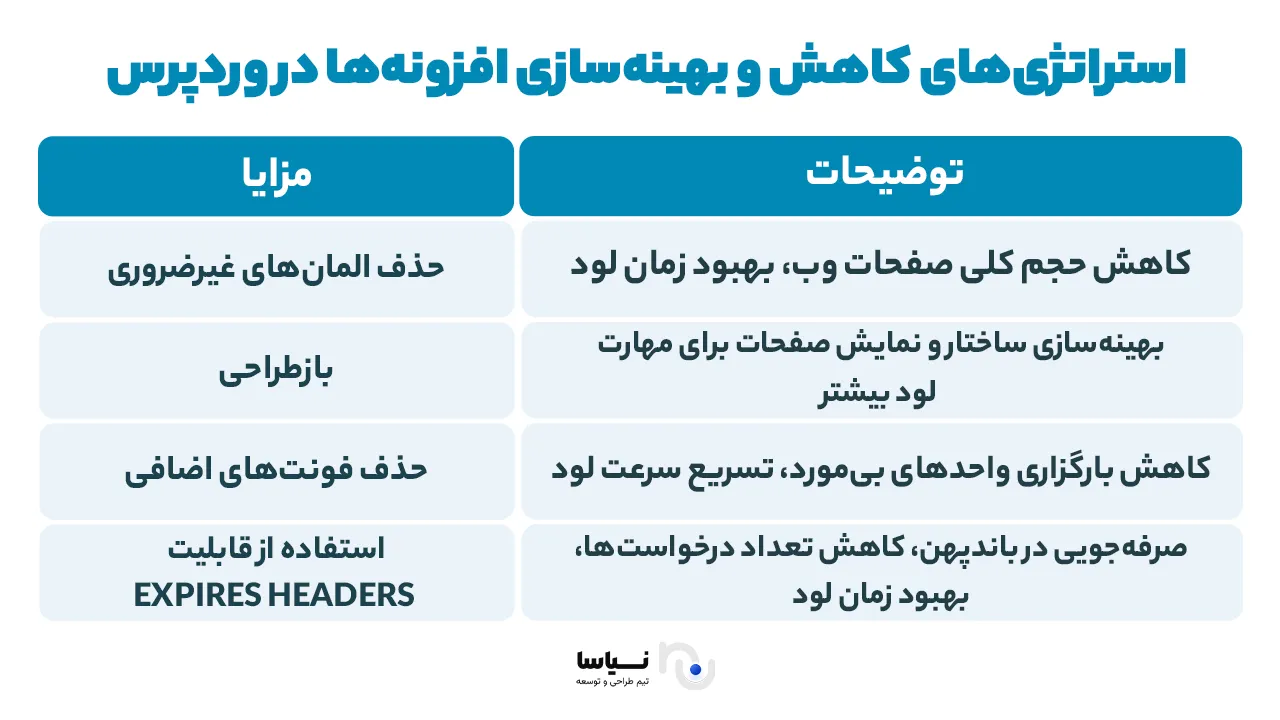
7 – Superfluous plugins in WordPress
Overusing unnecessary or unoptimised plugins in a content management system such as WordPress can have a negative effect on a site's speed and its security. Sensible, careful use of plugins is therefore essential.
8 – Superfluous and inconsistent redirects
Every superfluous redirect, like an unnecessary stop on the main route, reduces a site's load speed. Needless redirects should therefore be avoided and used only where they are genuinely required.
What to do to increase a site's load speed
There are various measures for increasing a site's load speed that can reduce page load times considerably. By optimising the server, the files and the site's resources, the user experience can be improved and a site's ranking in search results raised.
1 – Use a well-made theme
One of the fundamental steps in increasing a site's load speed is choosing a well-made, light theme. A site's theme bears directly on its technical performance and the user's experience. The qualities of a well-made theme include standard coding (HTML5, CSS3, JavaScript), compatibility with caching and SEO plugins, light CSS and JS files, responsiveness and support for lazy loading. Heavy themes with large files and complicated sliders increase load times and have a negative effect on SEO. To choose the right theme, use reputable, up-to-date themes and check one with tools such as Pingdom and GTmetrix before installing it. Using themes optimised for bespoke web design can also help a site perform better.
2 – Use a caching plugin
Using a caching plugin is one of the effective and simple ways of increasing a site's load speed. By saving a static version of pages and delivering it to users, these plugins reduce the load on the server and shorten load times considerably. By storing files and using resources efficiently, caching plugins help improve the user experience and a site's score in speed tests such as GTmetrix and PageSpeed Insights. Among the popular plugins for WordPress are WP Rocket, LiteSpeed Cache, W3 Total Cache and WP Super Cache. Important points when using them include configuring the settings properly, avoiding conflicts with the theme or other plugins, and working in step with a CDN. Used properly, a caching plugin can increase a site's speed by more than 50%.
3 – Use prefetch on the well-known domains your users draw on
Prefetch is a technique for preloading resources that lets a browser load in advance the resources it will need. Those resources may include domains that will be needed later (DNS prefetch), pages or files likely to be loaded soon (link prefetch), and JavaScript files, CSS, images and typefaces. Using prefetch reduces the time it takes to respond to a user's clicks, speeds up the transfer of data from external sources and improves the user's experience. One of the most common uses of this technique is DNS prefetch for third-party domains, such as Google Fonts or analytics tools. It is useful in particular for sites with a great many external resources and can increase a site's score in tools such as Google PageSpeed Insights.
The code for DNS prefetch:
<link rel="dns-prefetch" href="//fonts.googleapis.com">
<link rel="dns-prefetch" href="//www.google-analytics.com">
4 – Use a CDN, a content delivery network
A CDN (content delivery network) is a technology that lets your site's content be loaded from the server nearest the end user. Rather than sending every request to a central server, data is delivered to users from servers distributed around the world, which reduces latency and load time. If your site's server is in Germany, for instance, and a visitor comes from Iran, the CDN loads the cached content from a server nearer Iran. That reduces the load on the main server, increases page load speed, keeps a site stable under high traffic and improves security. The best CDN services include Cloudflare, BunnyCDN, StackPath and Amazon CloudFront. To connect a WordPress site to a CDN, you have to add the site's domain to the CDN's panel and configure the necessary settings.
5 – Optimise the WordPress database
A WordPress database holds a site's vital information: its posts, users' comments and plugin settings. Over time, unnecessary data such as superfluous revisions, spam comments and temporary information accumulates in the database and can slow a site down. Optimising the database includes removing superfluous data, compacting the database tables and using optimisation plugins such as WP-Optimize, Advanced Database Cleaner and WP-Sweep. That can free storage space and improve the database's performance. It is recommended that this be done periodically (at least once a week) and that a backup always be taken beforehand. Optimising a database regularly not only increases a site's load speed, it also improves its stability and its security.
6 – Turn off post revisions
Revisions in WordPress are saved versions of posts or pages, created automatically, that make it possible to return to an earlier version. Keeping too many revisions, though, can increase the size of the database and slow a site down. To improve matters, revisions can be turned off or their number limited. Plugins such as WP-Optimize and Advanced Database Cleaner can also be used to clear old revisions from a database. Limiting or turning off revisions helps reduce the size of a database, increase page load speed and improve a site's performance.
The code: to turn off revisions:
define('WP_POST_REVISIONS', false);
To limit the number of revisions:
define('WP_POST_REVISIONS', 5); // change 5 to the number you want
7 – Reduce the plugins on your WordPress site as far as you can
Plugins in WordPress are a powerful tool for adding capabilities to a site, but installing and enabling a great many of them can have a negative effect on a site's load speed. Plugins consume server resources, load extra code and may cause conflicts and compatibility problems. To improve a site's speed, unnecessary plugins can be removed and multi-purpose plugins or custom code used instead. Plugins should also be enabled only on the pages that need them. Some plugins, such as WP Rocket, LiteSpeed Cache and Autoptimize, can carry out several optimisation tasks at once and help reduce the number of plugins. Managing plugins properly increases a site's load speed and improves its overall performance.
8 – Combine or minify your JavaScript, CSS and HTML files
Optimising JavaScript, CSS and HTML files is one of the effective ways of increasing a site's load speed. They are usually the main resources loaded on a page, and their size can increase a site's load time. Combining and compressing them reduces the volume of data and the number of HTTP requests. Using lazy loading for unnecessary resources can also help a site's speed. Removing superfluous code and using tools such as Autoptimize and WP Rocket can carry out this process automatically. With these measures, page load speed increases, the user experience improves and a site's score in speed testing tools rises.
9 – Increasing a site's speed by reducing image sizes
Optimising images is essential for increasing a site's load speed. Large images can increase page load times and consume more bandwidth. Using the right formats — JPEG for photographs, PNG for transparent images and WebP for reducing size without a loss of quality — can have a considerable effect on a site's speed. Compressing images with tools such as TinyPNG and plugins such as Smush Image Compression also helps reduce file sizes. Lazy loading also means images are loaded only when a user scrolls to them, which reduces load time. Setting images to the exact size needed and using a content delivery network (CDN) are also effective in increasing a site's load speed. Optimising images brings better SEO, lower resource use and a better user experience.
10 – Increasing a site's speed with plugins
Using plugins can improve how a site performs, but some can reduce its load speed. Plugins that consume a great many resources or that are not optimised can increase the number of HTTP requests and put a heavy load on the server and the database. To increase a site's speed, you should choose well-optimised, light plugins such as WP Rocket and W3 Total Cache, which help with caching and improve a site's performance. Updating plugins regularly and removing unnecessary ones also play an important part in reducing the load on a server. Using combined plugins that bring several capabilities together, such as WP Rocket or Smush Image Compression, can help reduce the number of plugins and increase a site's load speed. Choosing and managing plugins properly has a considerable effect on a site's performance.
11 – Using the right hosting to increase a site's speed
Choosing the right hosting has a considerable effect on a site's load speed. Hosting with powerful servers, adequate resources (processor, memory, bandwidth) and high uptime can improve a site's speed. Shared hosting may reduce speed, particularly under high traffic, whereas dedicated hosting or a VPS performs better. Cloud hosting is also a good option for sites with variable traffic. The server's location also has a considerable effect on load time, so you should choose hosting with servers close to your target users. Quick, effective technical support also matters a great deal. By choosing hosting with adequate resources and good qualities, a site's load speed can be increased strikingly and a better user experience provided.
12 – Use separate hosting for video
Using separate hosting for videos can help improve a site's load speed. Loading videos from a site's main server can slow it down and have a negative effect on the user's experience. With separate hosting, the load on the main server falls and videos play faster and without delay. Services such as YouTube and Vimeo, and cloud hosting such as AWS and Google Cloud, are optimised specifically for hosting video and can handle heavy video traffic. Using content delivery networks (CDNs) such as Cloudflare can also reduce latency and improve playback speed. In the end, this approach helps reduce a site's bounce rate and increase users' satisfaction.
13. Removing superfluous elements and redesigning to increase a site's load speed
Removing superfluous elements and simplifying a site's design can have a considerable effect on its load speed. A great many HTTP requests and complicated code can make a site slow, so removing unnecessary images, scripts and widgets can increase load speed. Optimising CSS, JavaScript and HTML by compressing files and using a simple, user-friendly design helps reduce the volume of data and improves a site's performance. Removing complicated animation and using simpler colours and graphics can also reduce a site's load time. These measures not only increase a site's speed, they also improve the user's experience, reduce the bounce rate and help optimise a site for search engines.
14. Removing superfluous typefaces to increase a site's load speed
Removing superfluous typefaces and optimising the ones you use is one of the effective ways of increasing a site's load speed. Every typeface is a separate file that has to be loaded, and using several different ones increases the size of the files and the number of HTTP requests, which slows loading down. By removing unnecessary typefaces and using well-optimised, light ones, file sizes can be reduced and the number of requests kept to a minimum. Using well-optimised web fonts, system fonts and techniques such as font subsetting helps improve a site's performance and increase its load speed. These measures not only increase a site's speed, they also improve the user's experience and help optimise a site for search engines (SEO).
15 – Using Expires headers to increase a site's load speed
Using Expires headers is one of the effective ways of increasing a site's load speed and improving its performance. By setting an expiry date for static resources such as images, CSS and JavaScript files, browsers can load them from their own cache without sending new requests to the server. That reduces page load times, reduces the load on the server and makes better use of bandwidth. Using Expires headers also helps improve the user's experience and increase a site's speed and so has a positive effect on how a site ranks in search results. For resources that change, a shorter expiry can be set so that the newest versions are always loaded. This can be configured on Apache and Nginx servers and contributes greatly to a site's performance.
Setting Expires headers on an Apache server
On an Apache server, you can use the .htaccess file to set expiry dates. Put this code in the .htaccess file:
>IfModule mod_expires.c<
ExpiresActive On
ExpiresDefault "access plus 1 month"
ExpiresByType image/jpg "access plus 1 year"
ExpiresByType image/png "access plus 1 year"
ExpiresByType application/javascript "access plus 1 week"
ExpiresByType text/css "access plus 1 week"
>/IfModule<
Here:
ExpiresDefault "access plus 1 month" means that resources are cached by default for a month.
ExpiresByType image/jpg "access plus 1 year" means that JPEG image files are cached for a year.
ExpiresByType application/javascript "access plus 1 week" means that JavaScript files are cached for a week.
Setting Expires headers on an Nginx server
On an Nginx server, you can set Expires headers in the Nginx configuration file. Put the following code in it:
location ~* \.(jpg|jpeg|png|gif|css|js)$ }
expires 1y;
add_header Cache-Control "public"; {
Here:
expires 1y; establishes that resources are cached for a year.
add_header Cache-Control "public"; means that resources can be stored in a public cache.
This code helps you improve your site's performance by reducing the reloading of static resources.
How to test your site's speed
Testing a site's speed is an important step in improving how it performs and helps identify problems such as delays in page loading and heavy resource use. Using reputable tools such as Pingdom, GTmetrix, Google PageSpeed Insights and WebPageTest, you can identify a site's weak points and receive suggestions for increasing its load speed. These tools provide a careful examination of load times, server performance, file sizes and how a site's various resources are loaded. By analysing the results, you can make the changes needed and provide a better, better-made user experience. Improving a site's speed can also help improve its ranking in search engines and increase users' satisfaction.
Useful plugins for increasing a site's speed in WordPress
WordPress is one of the most popular content management systems (CMSs) used for building websites. One of the reasons for its popularity is the range of plugins available for improving how a site performs. In increasing a site's load speed, there are several plugins that can help you optimise your WordPress site. The leading plugins for increasing a site's speed in WordPress are:
WP Rocket
One of the best and best-known plugins for increasing a site's load speed in WordPress is WP Rocket. It lets you refine your site's performance readily. WP Rocket offers capabilities such as page caching, database optimisation, image optimisation and lazy loading of images.
W3 Total Cache
W3 Total Cache is one of the popular plugins for caching a site's pages and resources. By creating a cache for a site's content, it increases page load speed strikingly and, with careful configuration, can improve a site's performance.
Autoptimize
Autoptimize helps you optimise your site's CSS, JavaScript and HTML files. It minifies your site's files automatically and reduces load times. On sites containing a great many scripts or styles in particular, using Autoptimize can have a striking effect on load speed.
LiteSpeed Cache
If your site uses LiteSpeed servers, the LiteSpeed Cache plugin is one of the best options for optimising and increasing its load speed. It can cache pages and optimise a site's various resources and, with support for qualities such as compressing CSS and JavaScript, improves a site's performance.
Using the right hosting to increase a site's speed
Choosing the right hosting plays an important part in increasing a site's load speed. Hosting with powerful servers and adequate resources can reduce a site's load time and improve the user's experience. For small, low-traffic sites, shared hosting is suitable, but for larger sites a VPS or dedicated hosting is a better option. Cloud hosting is also a good choice because of its scalability and its guarantee of speed at different times. For WordPress sites, WordPress-specific hosting with its particular optimisations guarantees speed and security. Choosing hosting with CDN support, SSD servers and strong technical support can also have a considerable effect on a site's speed. Finally, attention to uptime and to a host's stability also matters a great deal.
In summary
A few of the points set out in this article — optimising images, choosing the right hosting, and using caching plugins and a CDN to increase a site's speed — matter a great deal indeed. Optimising CSS, JavaScript and HTML and removing unnecessary plugins also play an important part in reducing page load times. Taking all of this into account, sites that are continuously refined not only give their users a better experience but are also better seen in search results, which increases traffic and, in the end, turns more users into customers.